Your department, measured on its own terms
A full analytics tab scoped to your postings alone: applications, views, saves, engaged students, a real hiring funnel, honest engagement rates, and privacy-safe diversity, all drawn from your own student roster. Separate from the school, in your own secure portal.
Departments are added by their school. Your analytics tab is ready the moment your portal is set up.
Scoped to you
Only the opportunities your department posts, never the whole school
Period-scoped
Rates compare like for like across the selected window
Capped at 100%
Honest low-sample notices instead of misleading percentages
k-anonymity
Diversity hidden below ten applicants to protect identity
A separate compartment, with its own numbers
A department on StudentLife OS is not a sub-page of the school. It has its own login, its own team and permissions, and its own analytics that cover only what your department does. The school keeps a read-only window into your activity, and your postings roll up into its funnel, but the day-to-day view is yours alone.
Own portal
Separate login and permission matrix for your team.
Rolls up
Your postings appear in the school funnel under School and Department.
School sees read-only
The school monitors but cannot edit your analytics.
Scoped data
Every figure is computed against your department alone.
Open the tab, read it top to bottom
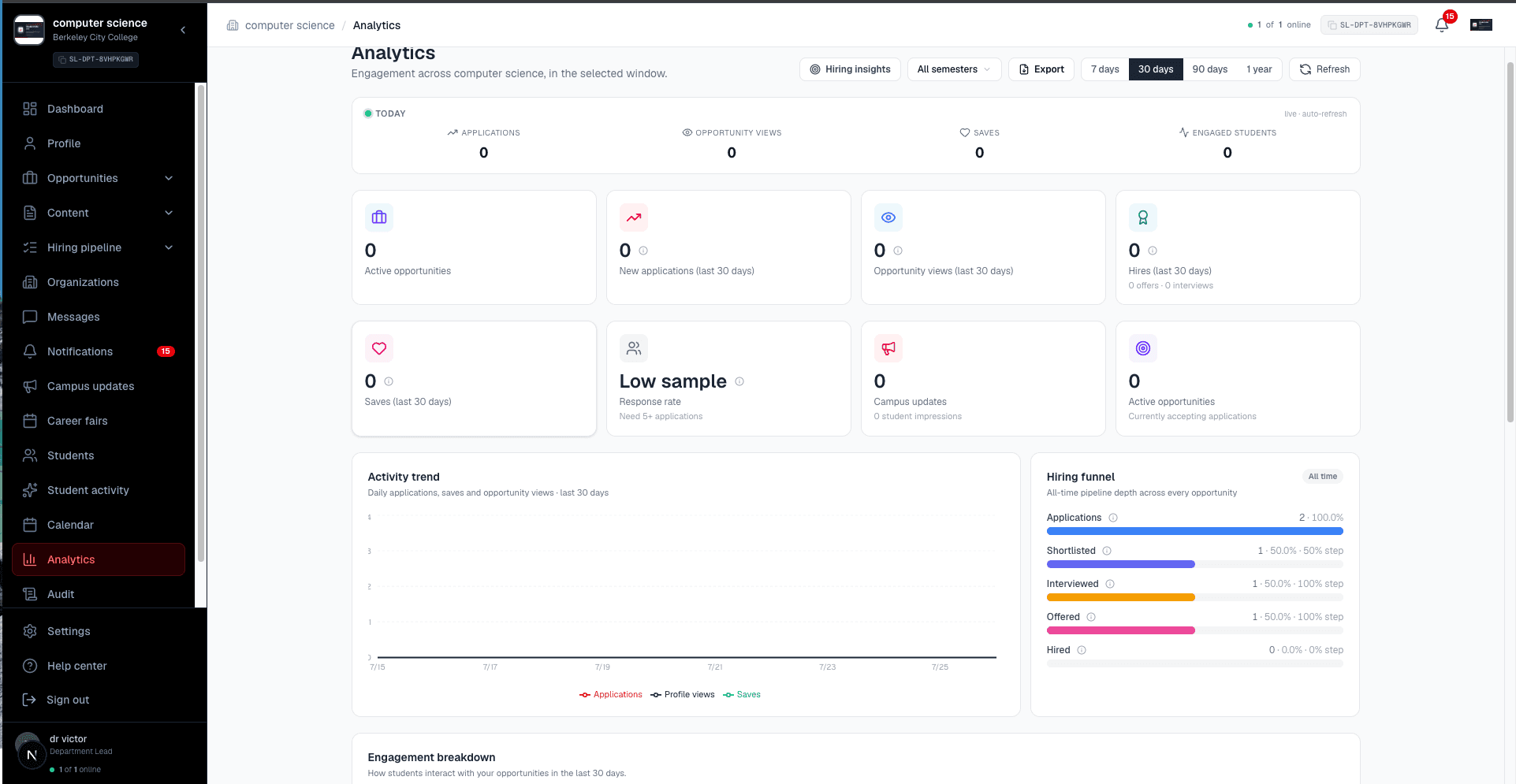
It opens on a live Today strip and thirty day cards, then flows into the activity trend and the hiring funnel, so you read the story in order instead of hunting across panels.
Live Today strip
Applications, opportunity views, saves, and engaged students for your department, ticking in real time.
Thirty day cards
New applications, opportunity views, hires with offers and interviews, saves, response rate, campus update impressions, and active opportunities.
Activity trend
Daily applications, saves, and opportunity views charted across your selected window, from seven days to a year.
Then the panels that explain why
Conversion rates that tell the truth even when the answer is "not yet", the type mix, your top postings, and the benefit listings you run.
Hiring funnel
All-time pipeline depth across every opportunity, from applications to shortlisted, interviewed, offered, and hired, with step conversion.
Engagement breakdown
Apply rate, save rate, and response rate for the window, each capped at 100 percent with an honest low-sample notice when there is not enough data.
Applications by type
How applications split across your opportunity types, filterable down to a single opportunity.
Top opportunities and full table
Your most-applied postings, plus a complete table of views, saves, applications, and conversion per opportunity.
Discount performance
Views, clicks, saves, and code copies for any student benefit listings your department runs.
Privacy-safe diversity
Aggregate applicant demographics with k-anonymity, suppressed below ten applicants, opt-in only, never fed to any AI ranking.
Your Students tab is where the numbers come from
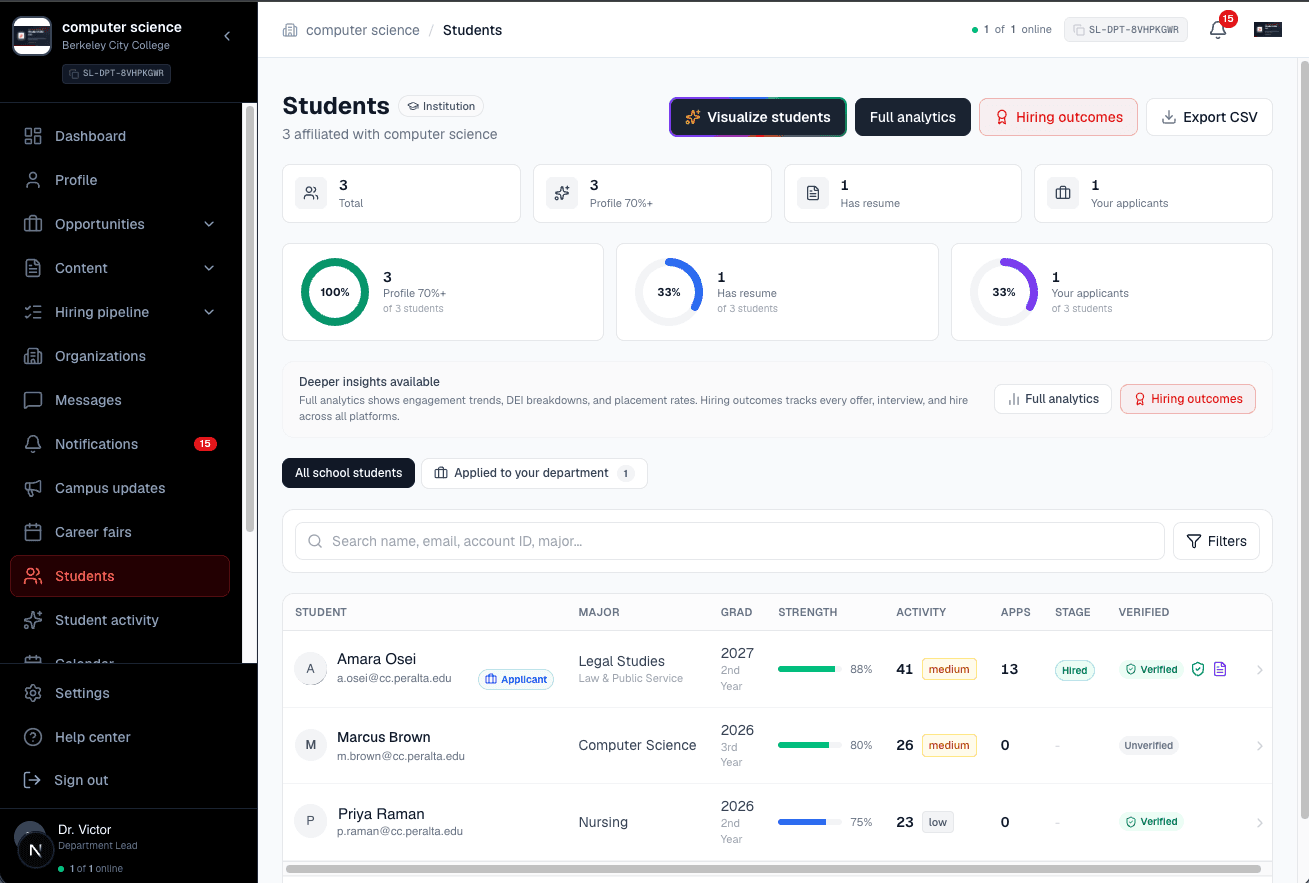
Your department roster carries every student affiliated with your parent school plus everyone who applied to one of your opportunities. That same population is exactly what your analytics measure. Open the roster, then open its analytics: the people and the numbers are the same set.
Every student below is seeded demo data. Real rosters are never shown on this site.
Your full roster
Parent-school students plus everyone who applied to your opportunities, in one place.
Outcomes by major
Students and hires per major category and specific major, drillable to the student.
Stage-to-stage pipeline
Applied, interviewed, offered, hired, each conversion measured against the prior stage.
Drill to the student
Click any segment, bar, or rate to open the exact students it represents.
Rates that tell the truth, even when it is "not yet"
A department often runs a handful of opportunities at a time, so small numbers are normal. Instead of charting a shaky percentage off three views, the engagement breakdown holds back until there is enough data, and tells you exactly how much more it needs.
Apply rate
Low sample awareApplications over tracked views. Needs at least ten views to compute.
Save rate
Low sample awareSaves over tracked views. Same ten-view reliability threshold.
Response rate
Low sample awareHow often your team moves an applicant forward. Needs at least five applications.
Diversity insights, built to protect applicants
Applicant diversity is aggregate only and never shows an individual. Breakdowns are hidden below ten applicants, demographics are shared only when an applicant opts in, access is controlled, and demographic data is never sent to any AI ranking.
Frequently asked questions
- What can a department measure?
- Everything scoped to your department. A live Today strip (applications, opportunity views, saves, engaged students), thirty day cards for new applications, opportunity views, hires with offers and interviews, saves, response rate, campus update impressions, and active opportunities. Below that, an activity trend, an all-time hiring funnel, an engagement breakdown with apply, save, and response rates, applications by type, your top opportunities, a full per-opportunity table with conversion, discount performance, and aggregate diversity.
- Is department data separate from the school?
- Yes. A department is its own secure compartment with its own login, its own permission matrix, and its own analytics tab. Your numbers cover only the opportunities your department posts. The parent school sees a read-only window into your activity and your postings roll up into the school funnel under its School and Department scope, but your department analytics are yours.
- How is the roster connected to the analytics?
- Your Students tab carries every student affiliated with your parent school, plus anyone who applied to one of your department opportunities. That same population is what your analytics are measured against, so the people in the roster and the numbers in the charts are the same set, and the counts reconcile across both.
- Are the rates accurate, or can they exceed 100 percent?
- Every rate uses a period-scoped numerator and denominator and is capped at 100 percent. When the sample is too small to be reliable, the panel says "Low sample" and tells you exactly how many more views or applications it needs, rather than charting a misleading percentage. The apply rate needs at least ten opportunity views and the response rate needs at least five applications before either is computed.
- What is in the engagement breakdown?
- Three honest conversion rates for the selected window: apply rate (applications over tracked opportunity views), save rate (saves over views), and response rate (how often your team moves an applicant forward). Each one either shows the percentage or, when there is not enough data yet, a clear low-sample explanation with the threshold.
- How does diversity reporting protect applicants?
- Diversity is aggregate only and never shows an individual. Breakdowns are suppressed below a minimum sample of ten applicants (k-anonymity), demographics are shared only when an applicant opts in, access is controlled, and demographic data is never sent to any AI ranking.
- Is it real-time, and can I export it?
- Yes to both. The Today strip and dashboard update the moment a student applies, saves, or moves through your pipeline, with a visibility-gated poll as a fallback. Filter by time window and academic season, then export to CSV, Excel, or PDF, or save the report straight to your department Documents library.
Built for the way departments actually work
Your own portal, your own team, your own analytics. See how a department gets set up under its school.