Everything your students need to succeed, in one place. Everything you need to run it, in one portal.
Your students should not have to sign up on a different website every day to find an internship, a scholarship, a research spot, or the resources they need. StudentLife OS brings it all together, and gives your school one secure command center to verify students, run departments, publish to campus, hire, and measure real outcomes.
No credit card to start. No price applies until we agree on one together. Full access for every department.
All in one
Every student resource and every campus tool on a single platform
Verified only
Your roster is real students, confirmed by a human where it counts
One price
Everything included, agreed with your institution, no module upsells
30 day trial
Full access first, and no charge until you decide to continue
The problem worth solving
A job board is not enough anymore
Student success is no longer a single feature. A student who is thriving is finding internships and jobs, winning scholarships, joining research and programs, going to hackathons and conferences, exploring careers on tours, meeting employers at fairs, volunteering, and getting the day-to-day resources, discounts, and food support that keep them going. When that lives on ten different sites, most students never find half of it, and your school never sees any of it.
We built StudentLife OS to end the scatter. One verified place for students, one secure portal for your school, and a real record of what is actually happening on your campus.
One place, not ten
Every opportunity and resource a student needs, gathered and verified, so they stop hunting across a dozen logins.
Visibility you never had
When students engage here, your school can finally see it: who is applying, getting placed, and where they land.
Outcomes you can prove
Honest, period-scoped analytics and a lasting record of past students give you numbers you can put in a report.
Is this for my school? Yes.
Built for every kind of institution
If you enroll and support students, this was built for you, and it carries your students forward as recent graduates and alumni so the relationship does not end at graduation.
High schools
Keep students informed, surface scholarships and programs, and prepare graduates for what comes next.
Community colleges
Connect a busy, commuting student body to jobs, transfer paths, scholarships, and campus events.
Universities
Run a large institution with many departments, each in its own secure portal under one roof.
Trade and technical schools
Move students from training to placement with employers who hire for skilled, hands-on roles.
Medical and nursing schools
Manage clinical programs, placements, and a verified roster for a high-stakes student body.
Engineering schools
Match technical students to internships, research, and roles that fit their exact discipline.
Everything your students get
The full experience of being a student, in one platform
Every one of these reaches your students through StudentLife OS. This is the exposure that turns a confused freshman into a graduating senior who knows exactly where they are headed.
Internships and jobs
Paid roles, internships, and part-time work from real, reviewed organizations across the country.
Scholarships and funding
Scholarships, fellowships, grants, and stipends, including need-based, merit, and identity-eligible programs where the law allows.
Research and programs
Research placements, structured programs, and apprenticeships that build a student toward a field.
Hackathons and competitions
Build days, competitions, and challenges where students ship something real and get noticed.
Conferences
Industry conferences and summits that put students in the room with people already doing the work.
Tours
Company and campus tours that let a student stand inside a career before they commit to it.
Career fairs and events
Virtual and in-person fairs and events that bring organizations directly to your students.
Volunteering and service
Volunteer roles and service opportunities that grow a student and give back to the community.
Resources and support
The practical resources students actually ask for, gathered in one place instead of scattered everywhere.
Student discounts
Real student discounts a student claims with a tap, so the platform pays them back day to day.
Food assistance
Food pantry listings and food support, because a student cannot succeed on an empty stomach.
A verified profile
A profile whose work, projects, and experience build over time, so a student is always ready to apply.
Most students do not yet know who they want to become
It is one of the hardest parts of being young: being asked to choose a future you have never seen up close. A student can read about a career for years and still have no feel for it. That uncertainty is where a lot of students get stuck, switch majors late, or graduate unsure of their next step.
Tours change that. When a student can walk through a company, sit in on a team, and stand inside a career before committing to it, the fog lifts. StudentLife OS makes tours a first-class opportunity type, right next to internships and scholarships, so your students explore who they want to be while there is still time to steer.
Exploration built into the platform
- See it before you choose itTours let a student experience a field firsthand, so a career decision is made with real exposure, not a guess.
- Steer early, not lateExposure from high school onward means fewer late major switches and fewer graduates unsure of their next step.
- Confidence that compoundsA student who has stood inside a few careers applies with conviction, and that shows in every application they send.
Your campus command center
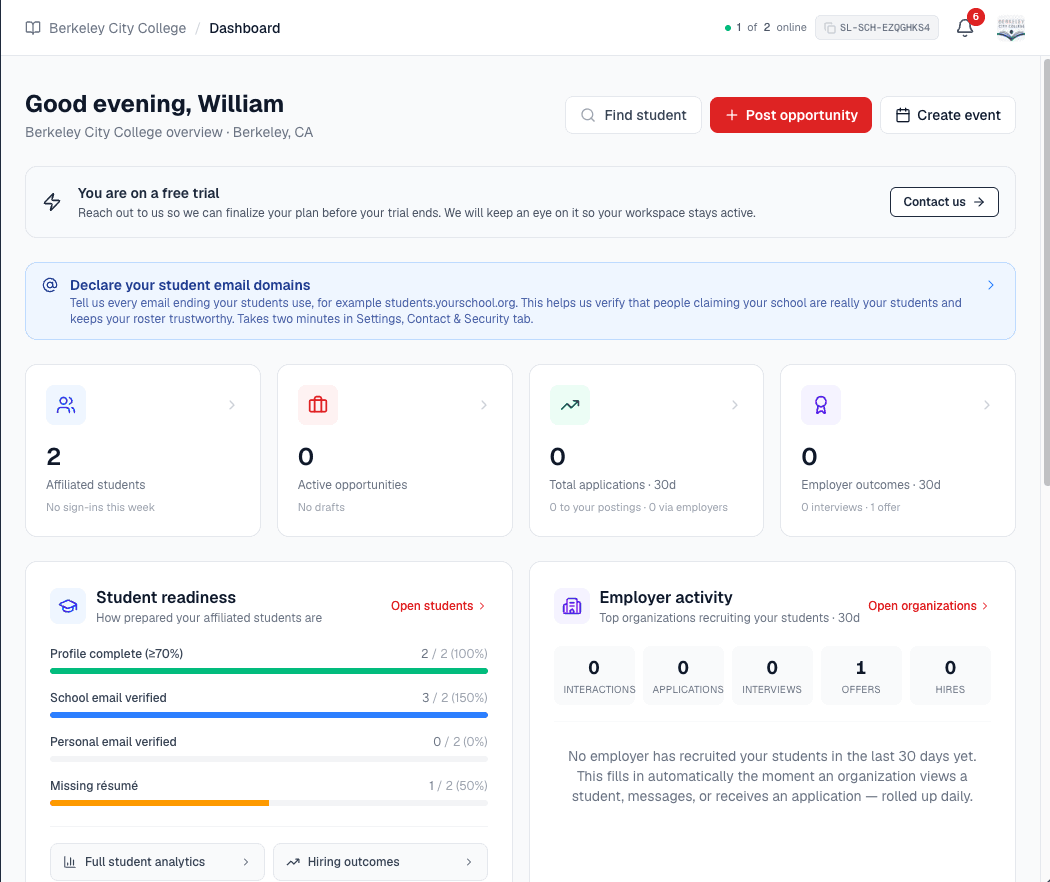
This is not a light dashboard bolted onto a job board. It is a complete institutional workspace. Below is every part of it, grouped the way you will actually use it, with nothing hidden.
Nothing hidden, everything counts
Every tab in the portal
A tab we do not tell you about is a tab you never use. Here is the whole portal, honestly described, so you know exactly what your school gets on day one.
Students and verification
The verified roster is the center of gravity. Everything else measures against it.
- Dashboard. A role-aware home with headline metrics, a setup checklist, quick actions, and a live snapshot of campus activity.
- Students. A roster of only platform-verified students, a read-only Pending tab, and a Needs review queue driven by our security team.
- Student activity. See how engaged your students are: who is applying, saving, and moving, and who has gone quiet and could use a nudge.
- Past students. Graduates never fall off the map. A read-only record of who came through, with tenure and outcomes, for years to come.
Departments
Each department runs as its own secure compartment, not a folder inside yours.
- Departments. Invite, monitor, suspend, or terminate any department. Each gets its own portal, team, and login, domain-locked to your school.
- Department opportunities. A read-only window into everything your departments post, so nothing on campus is invisible to the school.
- Auto department chat. A locked school-to-department group chat opens the moment a department activates, so the line is always open.
Campus and communication
Reach exactly the right students, and keep one clean inbox for everyone.
- Campus updates. Publish announcements that reach a targeted audience of students, with important-only filtering and follower fanout.
- Messages. One real-time inbox for students, departments, and organizations, with typing indicators, read receipts, reactions, and files.
- Notifications. A running record of applications, hiring updates, profile views, new followers, deadlines, and security alerts, with a live bell.
Opportunities and hiring
When your school runs its own roles, you get the full recruiting workspace, not a form.
- Opportunities. Post jobs, programs, scholarships, events, and more, pause and reactivate, gate with a pass, and share as a QR code or flyer.
- Hiring pipeline. Move every applicant from new to hired on a board or list, with a transparent match score and shared team notes.
- Applicants. Jump straight to the applicants for any posting, deep-linked from the dashboard and analytics.
- Interviews. Invite a candidate or a whole shortlist to your painted availability and let each student book a slot in their own timezone.
- Offers. Send offers with a deadline, notes, and attached documents, extend to a group at once, and track accepted, declined, and expired.
- Keep in touch. A talent pool for standout candidates, tagged and noted, ready the moment the next role opens.
- Automation. Fire a personalized email and the right documents when a candidate reaches a pipeline stage, set up once and run every time.
- Responses. Read exactly what students answered on any non-application form, filter by answer, and study submission analytics.
Events, fairs, and calendar
Bring organizations to campus and keep every date in one place.
- Career fairs. Host virtual or in-person fairs, manage signups, run QR and manual check-in, collect feedback, and email or export attendees.
- Events. Publish events and tours as opportunities students sign up for, with the same tracking and reminders as everything else.
- Calendar. One month view of interviews, fairs, and events, color coded, with a Today agenda and two-way Google Calendar sync.
Content: forms, passes, documents
The studio for everything you put in front of students, and everything they hand back.
- Forms. Build application, RSVP, interest, feedback, mailing-list, and custom forms from templates, each with a secure link and QR code.
- Passes. Create an access pass and hand it to a specific group, so only pass holders can see and apply to a gated opportunity.
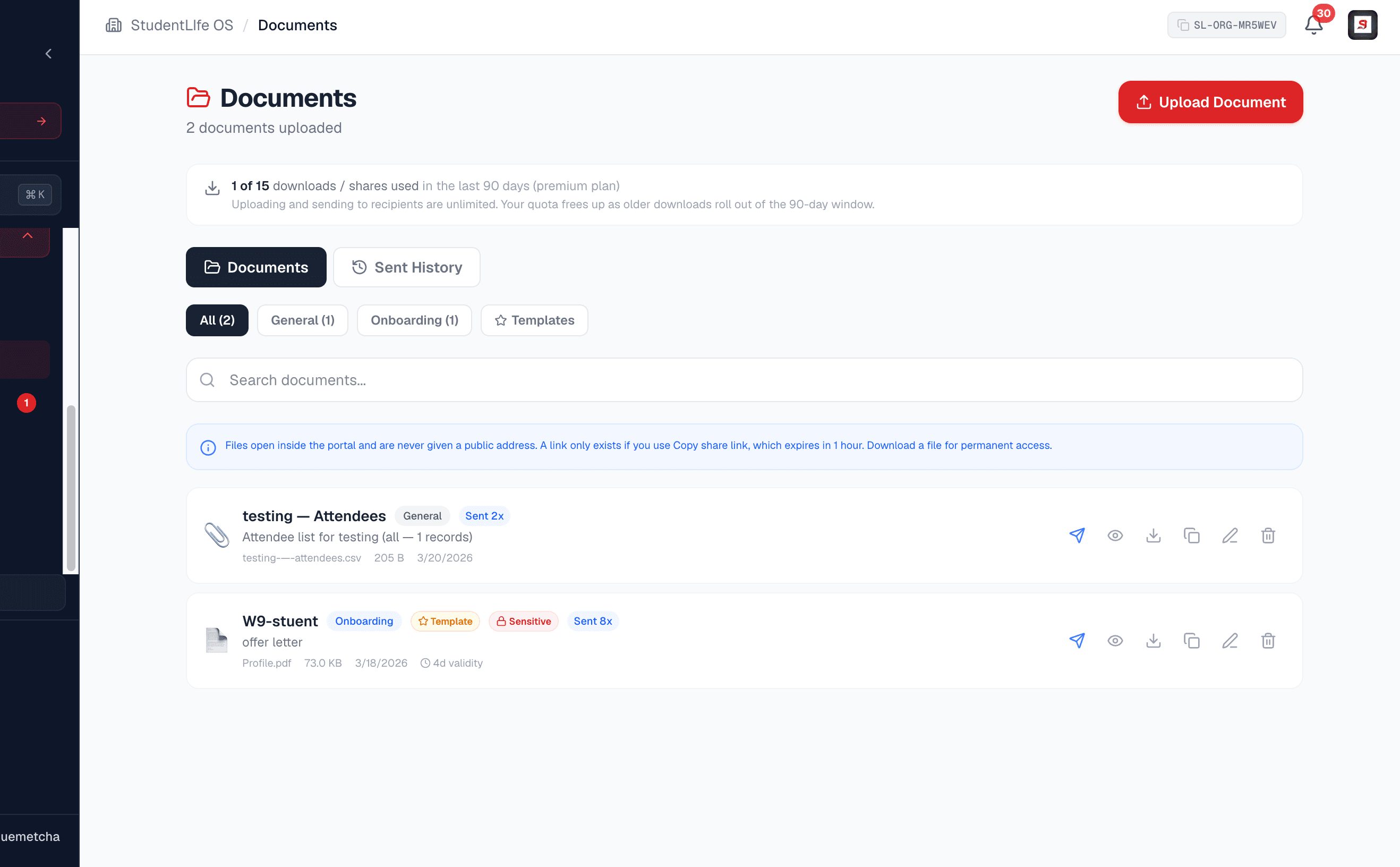
- Documents. A private, time-limited document library for offer letters, packets, and policies, with tracked delivery and full history.
Analytics and outcomes
Numbers you can stand behind in a report, drawn from your verified roster.
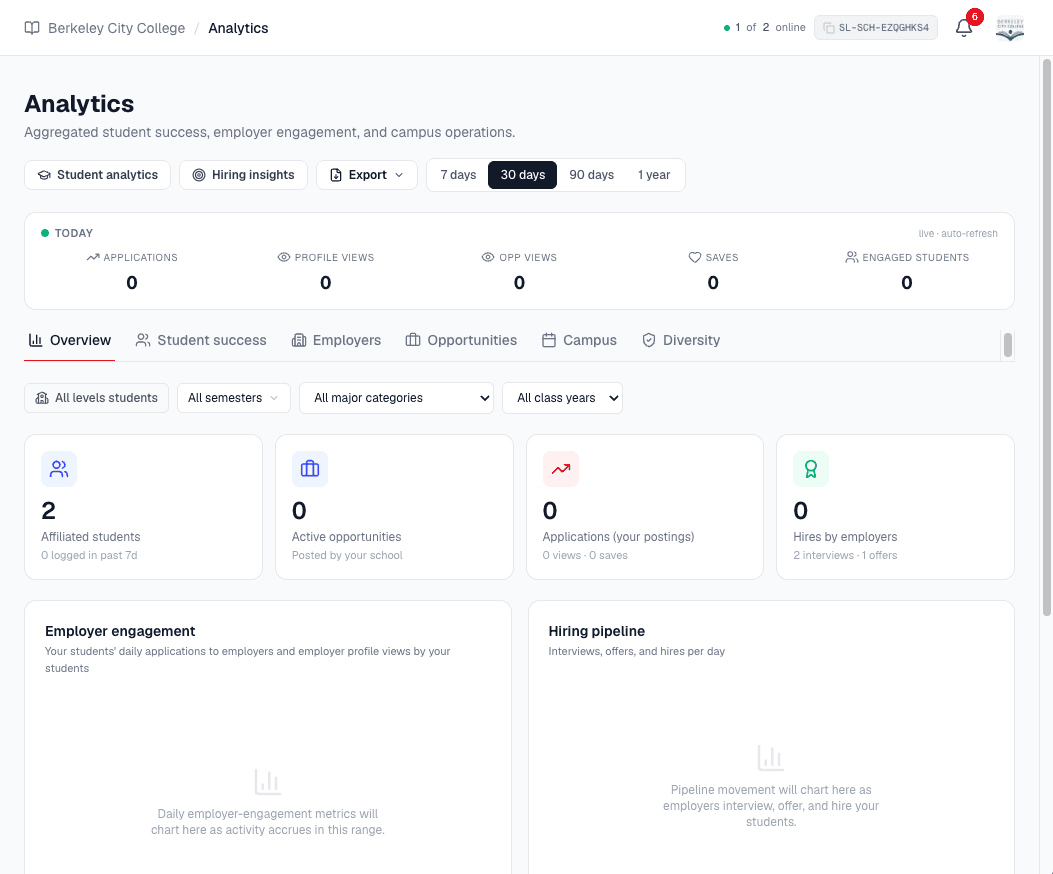
- Analytics. Student success, employer engagement, opportunity performance, campus operations, the hiring funnel, and privacy-safe diversity.
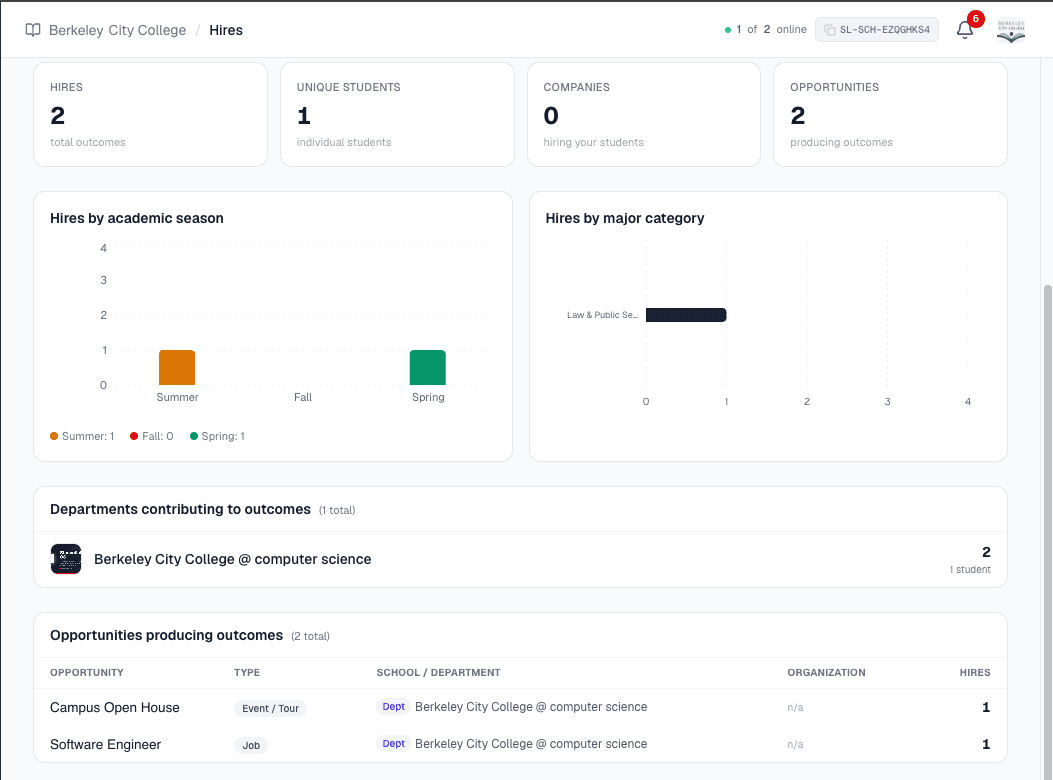
- Student analytics. Outcomes by major, season, term, and employer, drillable all the way down to the individual verified student.
- Exports. Every report to CSV, Excel, or PDF, or saved straight to your Documents library, with numbers that reconcile one to one.
Partnerships and organizations
Stay in direct contact with the organizations that hire your students.
- Organizations. Discover and search every organization on the platform, follow the ones you care about, and message them directly.
- Saved students. A shortlist of students your team wants to keep close, so a standout is never lost in the roster.
- Profile previews. Open any organization, school, or department profile through a signed, access-checked link, never a raw id.
- Employer arbitration. Warn an organization that is overstepping, escalate to our security team, and have it blocked from reaching your students. Departments flag, your school decides.
Team, security, and settings
Enterprise-grade control over who can do what, with a trail for all of it.
- Team and roles. Invite your office with eight scoped roles, enforced on the server, so a seat can never reach an action it should not.
- Security reviews. See the status of every report your school filed, with outcomes and a clear timeline, the same way a student sees theirs.
- Settings. MFA, recovery email, password and email changes, session list with per-device revoke, data export, and account controls.
- Profile and Help. A public school profile that shows your departments and fairs, plus a How-it-works guide on nearly every tab.
- Billing. One clear place for the owner to see the plan, renewal date, reminders, and to check out when the trial ends.
Built to scale with your whole campus
How a campus of 123,000 students stays manageable
No single office can personally look after every student on a large campus. So we do not ask it to. StudentLife OS lets you delegate campus life to departments, each running its own secure portal, while the school keeps a clear, automatic view of how every one of them is doing. That is how a hundred thousand students becomes a set of well-run, accountable units, and how every student ends up served by someone close to them.
The people closest to the students, doing the work
Different departments have different students, different employers, and different kinds of opportunities. An engineering department posts internships; a nursing program posts clinical placements; the career center runs fairs. None of them should have to route every post through one overworked person at the top.
- No bottleneckEach department posts its own opportunities and recruits its own students directly, without waiting on a central office to do it for them.
- A real team with a hierarchyEvery department has its own portal, its own login, and a lead over admins, recruiters, and viewers, each with permissions scoped and enforced on the server.
- Professional and organizedWork is divided the way your institution actually works, so campus life is run by the people who understand each corner of it.
Delegated, never blind
Handing work to departments does not mean losing sight of it. The school automatically gets a read-only view of every department: what they post, how many students they reach, how they hire, and the outcomes they produce, rolled into your own analytics with no extra setup.
- See which departments are thrivingPer-department engagement, opportunities, and hiring roll up to the school, so you can tell at a glance who is contributing to student success.
- Fund what actually worksWhen you can see which departments move students forward and which are quiet, you can direct funding and support where it has real impact.
- Accountability, and a safety netA department that is working is visible, and a student who is being underserved is visible too, so no one slips through on a campus that large.
The result is an institution that is decentralized where it should be and unified where it counts. Each department owns its students and its outcomes, and the school owns the whole picture, so every student, on a campus of any size, has a real shot at thriving.
See how department portals workBetter analytics, and the honest kind
Every number is drawn from your verified roster and computed period-scoped, so a 30-day filter reports a 30-day rate, never a window divided by a lifetime total. Rates cap at a true 100 percent, small samples say so instead of charting a lie, and exports match the dashboard one to one. It is analytics you can put in front of a board, not a vanity chart.
The full picture
Student success, employer engagement, opportunity performance, campus operations, the hiring funnel, and privacy-safe diversity.
Drill to the student
Outcomes by major, season, term, and employer, clickable all the way down to the individual verified student.
Report ready
Export to CSV, Excel, or PDF, or save straight to Documents. Capped rates and reconciled counts included.
A record that lasts
Nothing important disappears
Students graduate, staff turns over, and years pass. The work you did should not vanish with them. Two parts of the portal exist to keep your institutional memory intact.
A record of past students
Graduates are carried into a read-only Past Students view automatically, with their tenure and outcomes intact. When a student graduates, their history stays with your school, feeding your analytics and giving you a lasting picture of the classes that came through, long after they have moved on.
- Graduated students move to Past Students automatically
- Tenure and outcomes are preserved for analytics
- Verified-only, so the record is real
- Nothing is deleted when a class graduates
A document library for years
The Documents tab is a private, secure library where offer letters, packets, policies, exports, and saved reports live. Links are time-limited rather than permanent, every send and view is tracked, and a report you save today is still there and still readable years from now, no matter who is sitting in the office.
- Private, time-limited links you can rotate anytime
- Send a document by email and track delivery end to end
- Save exports and reports straight from analytics
- A durable library that outlasts staff turnover
The rest of campus, covered
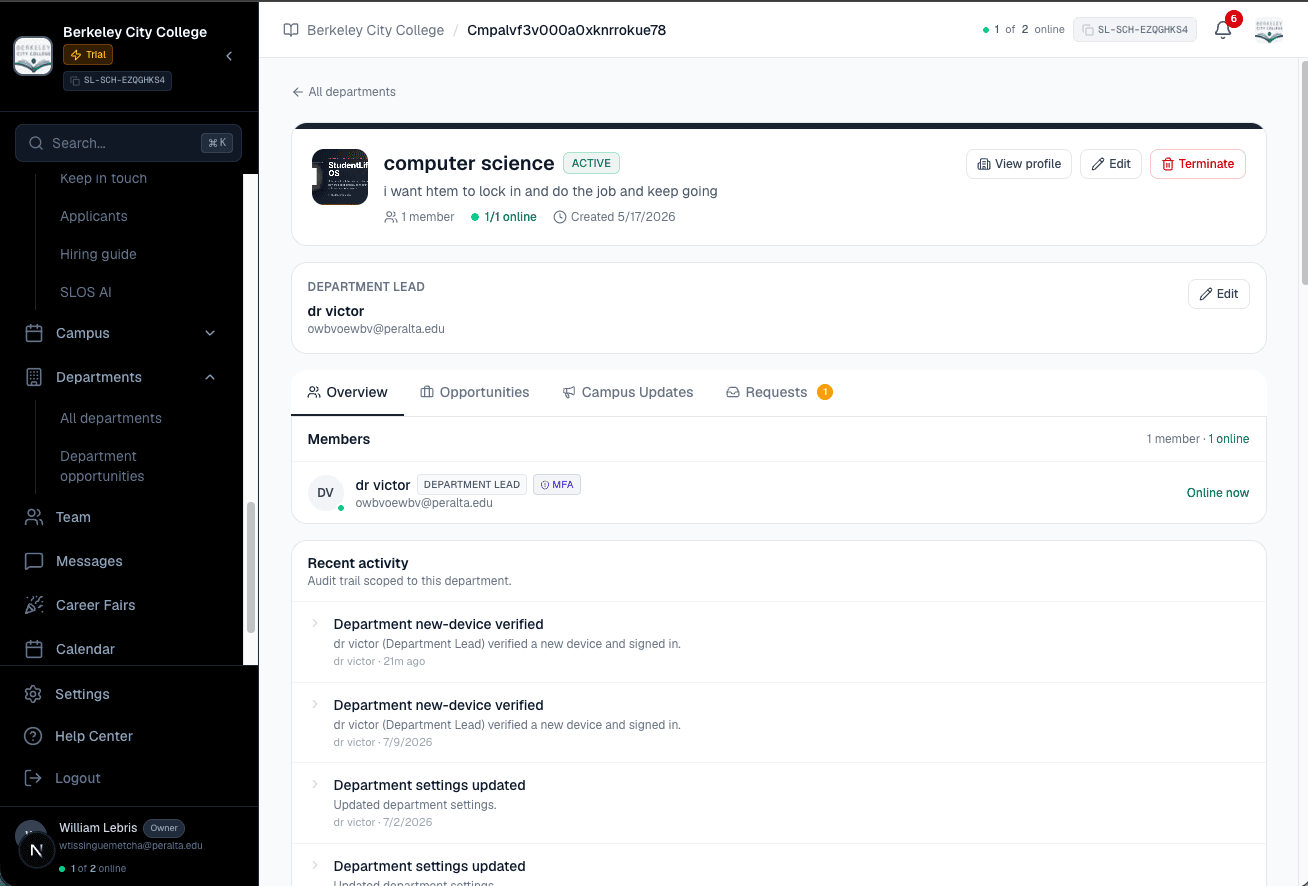
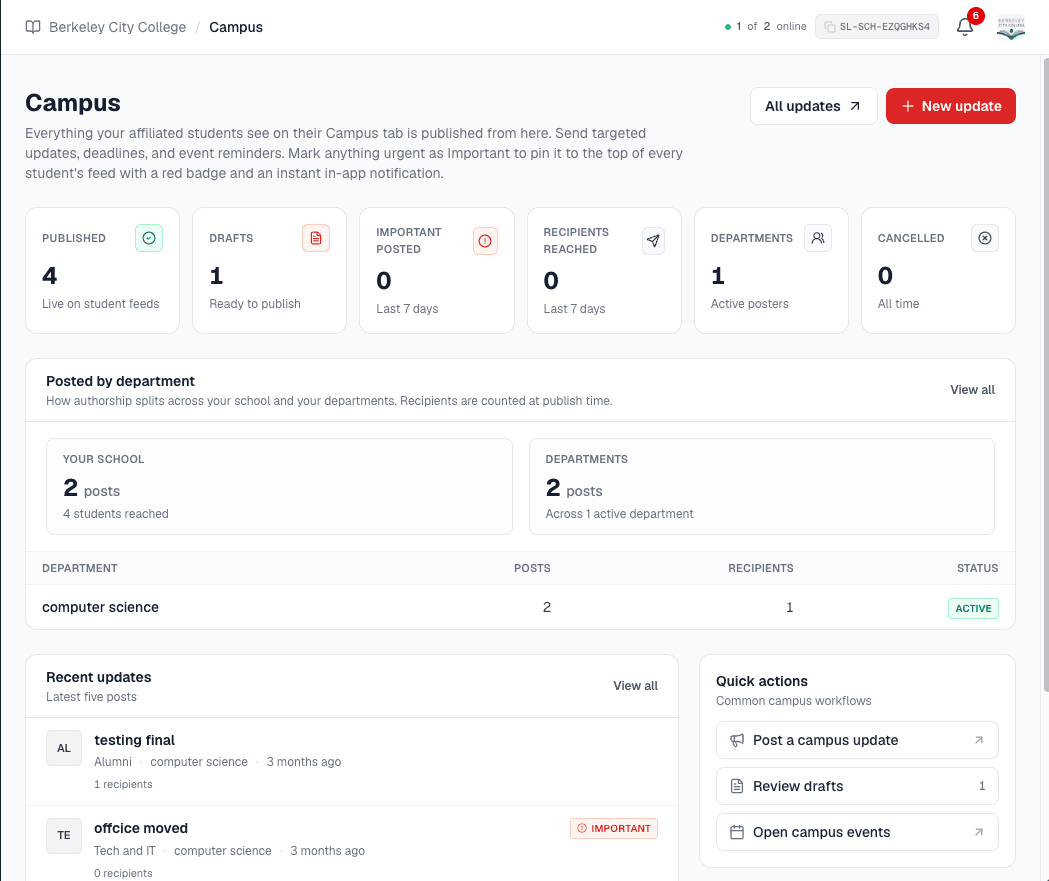
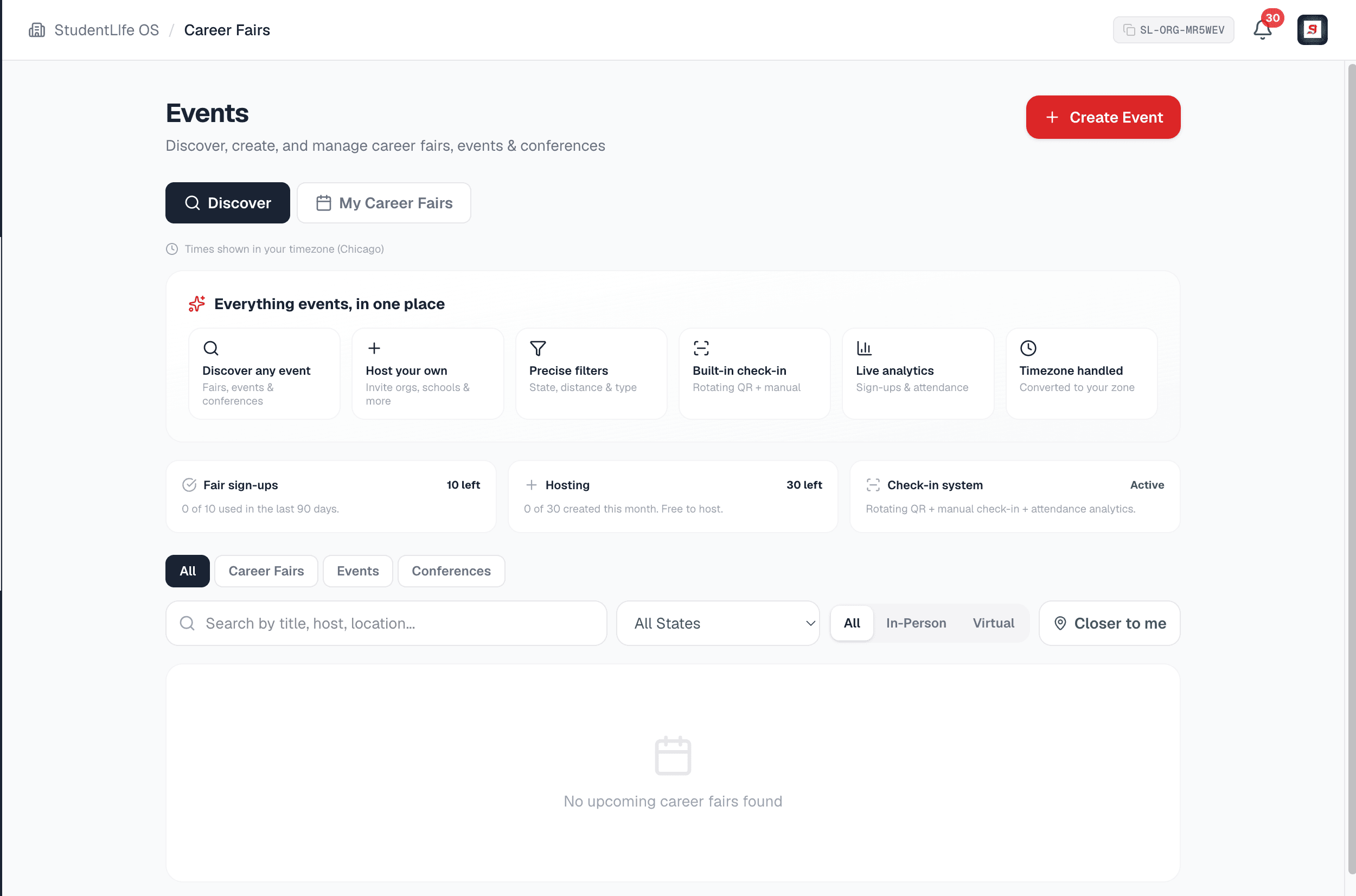
Departments, announcements, and bringing employers to campus
Give every department its own secure portal, publish announcements to exactly the right students, and host career fairs that bring organizations directly to your campus, all from the same place.
Your students, your call
You can stop an employer from reaching your students
If an organization is overstepping with your students, you are not stuck emailing support and waiting. You have a real remedy, and it is enforced on our servers on every request. It runs through four steps on purpose: the employer gets a chance to fix it, and an independent reviewer signs off before anything hard lands, which is what makes the decision hold up if it is ever challenged.
- 01Department
Flag it
A department raises a concern with a written reason. It lands in a review queue on your Organizations tab and rings your bell. Departments cannot block, ever. Optional: you can start at step two yourself.
- 02School
Warn the employer
You file a warning naming the concern. We notify the organization and open a direct thread between you, so it can be settled between the two of you. Most cases end here.
- 03Our security team
Independent review
If the warning changed nothing, you escalate. Our team reviews the request, can mediate with you, the employer and the department together, and approves or rejects it. A school cannot block alone.
- 04Enforced
The wall goes up
No messages, no platform email, no profile access, no following, and their postings vanish from your students’ feed, search, saved lists, digests and calendar. You can lift it whenever you want.
What a block deliberately does not do
It is scoped to your school and it is forward-looking. Applications, interviews and offers already under way are left intact. No other school is affected, and the employer keeps its account. The employer is told which school blocked it and gets a channel to respond, but never learns which of your students were hidden or how many. Every step is written to a tamper-evident audit log on both sides.
A student who already applied can finish
If one of your students had applied to a specific opportunity before the block took effect, that one application runs to completion. The automatic updates keep flowing: status changes, interview invitations and times, offers and their deadlines, and documents such as an offer letter. The student also keeps access to that posting, so they can still open it, keep its deadline on their calendar, and book, reschedule, decline or respond to an offer. That is deliberate. Cutting it off would punish a student for a dispute they are not part of and would leave an application they made in good faith with no answer.
It is scoped to that one opportunity, not to the employer. Every other posting stays hidden from that student, they cannot start a new application or save a listing, and blocked postings never come back to search, the feed, recommendations or a digest for anyone. It never lets the employer write to that student or reach anyone else at your school, and it ends when the application does.
Built to protect a campus of private data
You are trusting us with students, staff, and sensitive records. We treat that as the foundation, not a feature. Every compartment is isolated, everything sensitive is encrypted, and every important action leaves a trail.
Isolated compartments
Students, organizations, schools, and departments live apart, with no cross-trust. A wrong cookie is rejected before any read.
MFA and scoped roles
Multi-factor on every account, required for sensitive roles, and eight roles enforced on the server, not just hidden buttons.
Tamper-evident audit
A hash-chained log of who did what and when, plus a session list with per-device sign-out.
Emergency controls
Operator kill switches and forced re-verification exist for the day something goes wrong, so a breach can be contained fast.
Why us, not the other guys
One platform against a stack of tools
General campus-recruiting tools do one slice well and split the rest across paid add-ons or leave them out. StudentLife OS gives your students the whole experience and your school the whole workspace, for one price.
| Capability | StudentLife OS | Typical campus tools |
|---|---|---|
| Only verified, enrolled students on the roster | Partial | |
| Every opportunity type, not jobs alone | Jobs first | |
| Scholarships, research, hackathons, and conferences | Rare | |
| Tours that let students explore a career | ||
| Student discounts and food assistance | ||
| Campus updates targeted to the right students | Broadcast | |
| Each department as its own secure portal | ||
| A full hiring pipeline for school-run roles | Add-on | |
| Identity-blind AI candidate match | ||
| Honest, period-scoped analytics, never inflated | Varies | |
| A lasting record of past students and outcomes | Limited | |
| A document library that lasts for years | Varies | |
| Interview self-scheduling with timezone handling | Add-on | |
| Career fairs with QR and manual check-in | Varies | |
| One inbox for students, departments, and orgs | Partial | |
| Per-seat MFA and a tamper-evident audit log | Varies | |
| One price for everything, not module by module | Per module |
This comparison reflects our understanding of capabilities generally available to schools from campus tools such as Handshake and similar platforms, which vary by provider and plan and change over time. The point is simple: with StudentLife OS a school gets the whole experience in one place rather than assembling and paying for it piece by piece.
Simple, all-in pricing
One price. Everything included. No modules to unlock.
Schools are not on self-serve tiers. We agree one fair price with your institution after a short conversation, and once your school is active, every department and every team member has the full platform. Because everything is in one place, you qualify for a better price than stitching together a stack of separate tools, and your students never have to pay for, or hunt across, several sites.
30-day free trial
Full access from day one, with no credit card. The trial begins when you finish onboarding, not at sign-up, so no days are wasted on setup.
A price that fits you
We talk with your institution and agree on one price for everything. Choose a six-month or yearly term; yearly is recommended.
No surprises
It renews automatically each term until cancelled, you can pay in advance for more periods, and reminders arrive well before the date.
Some schools qualify for a welcome merch kit
As a thank-you for coming aboard, select schools receive a welcome merch kit sent to campus. It is not a guarantee for every account, and our team will let you know if your school is eligible. It never affects your features or access, which are always the full platform once your school is active.
When your trial ends, the school owner checks out from the Billing tab and the whole school unlocks the moment payment clears. Until then, all your data is safely retained.
The simple test
If you care about your students being ready for what comes next, this was built for you.
Keeping up with your students, giving them every resource they need, and being able to show what your campus is really doing should not take ten tools and a spreadsheet. It should take one platform.
Frequently asked questions
- What does StudentLife OS give a school that a job board does not?
- A job board gives your students jobs. StudentLife OS gives your students everything: internships and jobs, scholarships and funding, research and programs, hackathons, conferences, tours, career fairs and events, volunteering, resources, student discounts, and food assistance, all in one verified place. It also gives your school the tools to run all of campus life from one secure portal: a verified student roster, departments as their own compartments, campus updates, a full hiring pipeline, honest analytics, a lasting record of past students, a document library, partnerships with organizations, and one shared inbox. It is the difference between a single feature and the whole platform.
- How does pricing work for schools?
- Schools are not on self-serve tiers and there are no feature tiers to compare. We agree one price with your institution after a short conversation about your size and needs, and that price begins only after a 30-day free trial that starts when your school finishes onboarding, not at sign-up. You choose a six-month or yearly term, yearly recommended, and once active every department and team member has full access to everything. The subscription renews automatically each term until cancelled, you can pay in advance for more periods, and we send renewal reminders both by email and inside the portal as the date approaches.
- What happens if we do not pay after the trial?
- Nothing is deleted, ever. Until the school has an active, paid subscription, the whole school, including its departments and their team members, is locked while all your data is retained. During that time only the owner can reach the Billing tab to check out or contact us, and department staff are directed to the school owner, who is the only person able to renew. The moment payment clears, access is restored for the entire school at once. Access is enforced on our servers, so it cannot be bypassed by editing a URL.
- Do some schools really get free merch?
- Some schools qualify for a welcome merch kit sent to campus. It is a thank-you for coming aboard, not a guarantee for every account, and our team lets you know if your school is eligible. It has no effect on features or access, which are always the full platform once your school is active.
- How do you know the students on our roster are really ours?
- Verification is layered, and a real person is behind it where it counts. Every student proves they are a real, enrolled student through a document our team reviews or a verified school email, and after your school is approved you declare the email format your students use so matching students stay verified at scale. Your roster shows only platform-verified students, with a read-only Pending tab and a Needs review queue that contains only the students our team explicitly asked you to confirm. Your school never blocks an account itself; you answer yes or no and our team makes the final call.
- Do our departments and career center get their own space?
- Yes. A department is its own secure compartment with its own portal, its own team and login, its own opportunities, hiring, campus updates, career fairs, analytics, and audit trail. It is domain-locked to your school, and the school sees a read-only window into department activity plus two levers, cancel a published campus update and suspend or terminate the department. A department is never a folder inside your account; it is its own principal, which is exactly how a real career center or academic department operates.
- Can we reach employers and other schools directly?
- Yes, and it costs nothing extra. Your Partners tab is a searchable directory of every employer, peer school, and department on the platform, and you can message a filtered audience of them straight from your Messages tab. Employer filters include industry, organization type such as company, nonprofit, government agency, foundation or startup, company size, state, region, city, verified employers only, employers who are currently posting opportunities, and whether you already follow them. Peer institutions can be filtered by type such as university, community college, trade school or bootcamp. This is how a career center builds an employer pipeline instead of waiting for one to arrive.
- Are any of those partner filters locked behind a higher tier for us?
- No. Employers have plan tiers; schools do not. You pay one negotiated price for full access, so every partner filter, the directory export, and partner outreach itself are all included, and there is no requirement to narrow an audience before you send. The only bound is a per-campaign recipient cap, which protects our infrastructure rather than your plan.
- Can our departments do this too?
- Yes. A department has the same Partners tab and the same partner outreach, with the same filters and no gating, under your school's single price. A department sends as "Department at School" so an employer always sees the institution behind it, and every campaign is recorded in both the department activity log and yours.
- Can our school block an employer from reaching our students?
- Yes. This is a real, enforced remedy, not a preference setting. You start by sending the organization a warning that names the concern, which notifies them and opens a direct conversation so it can be resolved between you, and most cases end there. If it does not, you escalate and our security team reviews the request independently and decides. Once a block is approved, that organization can no longer message your students in a direct or group conversation, email them through the platform, view their profiles, find them in a recipient picker, or follow them, and its opportunities stop appearing to your students in their feed, search, saved lists, digests and calendar, including through a shared link. It is enforced on our servers on every single request, so it cannot be bypassed by editing a URL or using an old link. The block is forward-looking and scoped to your school: applications, interviews and offers already under way are left intact, no other school is affected, and you can lift it at any time. One deliberate exception protects your students rather than the employer: a student who had already applied to a specific opportunity before the block took effect can finish that one application. They keep receiving the automatic updates about it, such as a status change, an interview time, an offer and its deadline, or an offer letter, and they keep access to that posting so they can open it, keep its deadline on their calendar, and book, reschedule, decline or respond, so nobody is left waiting on an answer because of a dispute they are not part of. The exception is scoped to that one opportunity, not to the employer: every other posting stays hidden, the student cannot start a new application or save a listing, the employer still cannot write to them, add them to a group conversation, attach a personal note to a document, or reach anyone else at your school, and it ends once that application is finished. There is no instant one-click block on purpose, because the organization gets a chance to answer and an independent reviewer signs off, which is what makes the decision defensible if it is ever challenged.
- Can a department block an employer, or only the school?
- Only the school. A department can flag an organization to its school with a written reason, and that flag opens a review item on the school Organizations tab and rings the school owner bell. The school can acknowledge it, dismiss it with a reason the department sees word for word, or escalate it into a formal block request for our security team. A department can never block an organization, lift a block, or act on the school behalf. The same principle runs through the whole platform: departments raise concerns, the school decides, and our team is the independent check before anything hard lands.
- Is our data secure and private?
- Security is the foundation, not an add-on. Students, organizations, schools, and departments live in fully isolated compartments with no cross-trust. Data is encrypted in transit and at rest, private messages are stored as ciphertext, multi-factor authentication is available on every account and required for sensitive roles, and every sensitive action is written to a tamper-evident, hash-chained audit log. Diversity analytics are aggregate only, opt-in, hidden below a minimum sample of ten students, and never fed to any AI ranking. Location is approximate and derived only from the network edge, never a device GPS prompt.
- How is this better for our students than making them use several sites?
- Students told us plainly that the old way meant signing up on a different website every day and still not finding the support they needed. When everything a student needs lives in one verified place, they actually use it: their profile builds over time, their calendar and friends are here, and real support keeps them coming back. That means higher engagement, better outcomes, and a record your school can point to, instead of activity scattered across tools you cannot see.
- How do we get started?
- Start a 30-day free trial from the school sign-up page and set up your portal, or contact our team to talk through your institution first. There is no charge during the trial, and no price applies until you and our team have agreed on one. When you are ready, the school owner checks out from the Billing tab and the whole school is unlocked the moment payment clears.
Bring your whole campus onto one platform
Give your students every opportunity in one verified place, and give your school the command center to run it. Start free, and pay only once you decide it is worth it.
Operated by StudentLife Technologies LLC, 1 Sansome St, Suite 1400, San Francisco, CA 94104.
Who to contact at StudentLife OS
School pricing starts with a conversation. Write to the inbox that fits and a person will reply.
Product support
Your account, billing, verification, or something on the platform that is not working.
support@studentlifeos.comTalk to our team
Book a walkthrough, ask whether StudentLife OS fits your school or organization, or send us feedback.
team@studentlifeos.comPartnerships and press
Partnership proposals, media requests, brand assets, and anything marketing.
marketing@studentlifeos.comPrefer to talk it through? Call(415) 508-8610