Host events that fill the room, and run check-in without the clipboard.
Discover any career fair, event, or conference in the network, or host your own end to end. Target the right organizations and schools, manage signups, check attendees in with a built-in QR scanner, and watch attendance climb in real time, with every time shown in your own timezone.
Discover the whole network in one feed and set up your first event in minutes.
Fall Tech & Internship Fair
CHECKIN-7F3A2C
of 320 registered
One feed
Every fair, event, and conference across the network
QR check-in
Rotating, secure codes plus manual list check-in
Live attendance
Check-ins update in real time as people arrive
Timezone-aware
Times shown in each viewer own settings zone
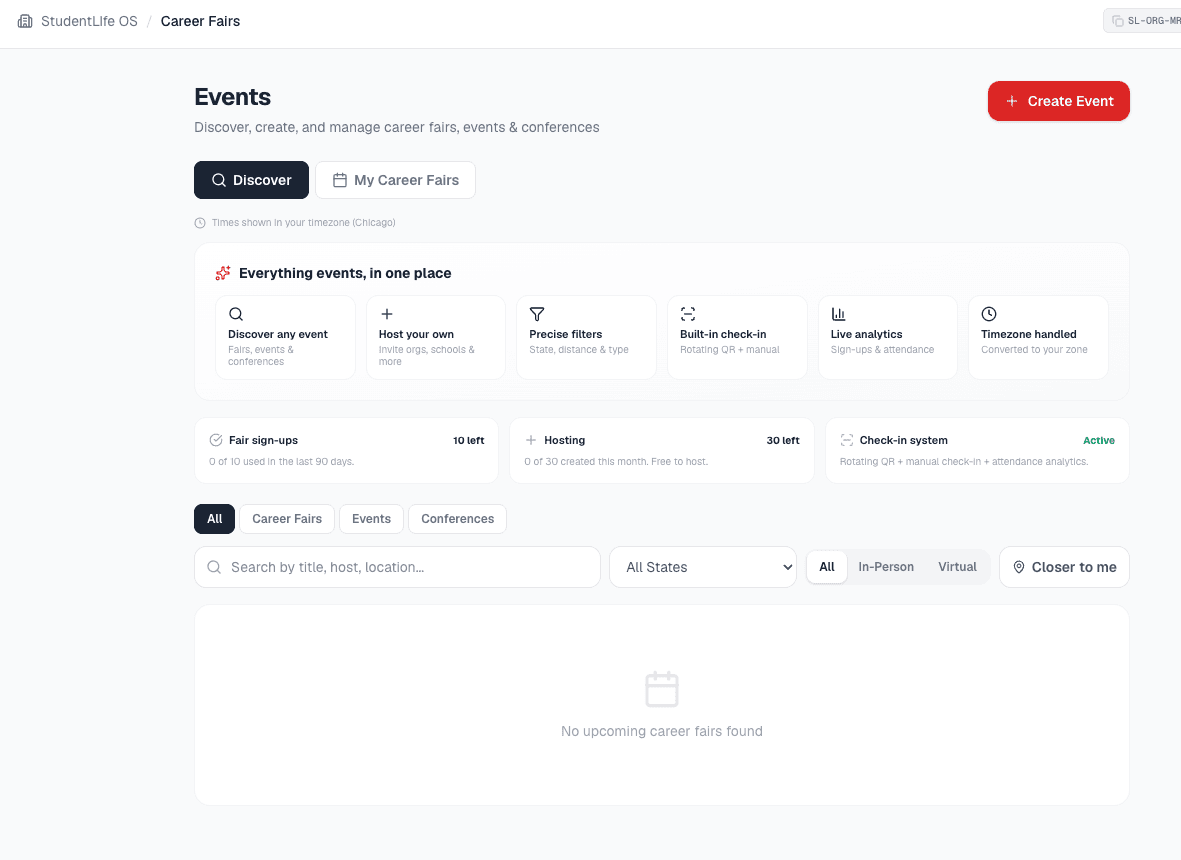
Everything events, in one place
From discovery to check-in to the follow-up, the whole event lifecycle lives in one tab, with the analytics handled for you.
Find any event
Browse career fairs, events, and conferences across the network. Filter by type, state, virtual or in person, and sort by what is closest to you.
Host in minutes
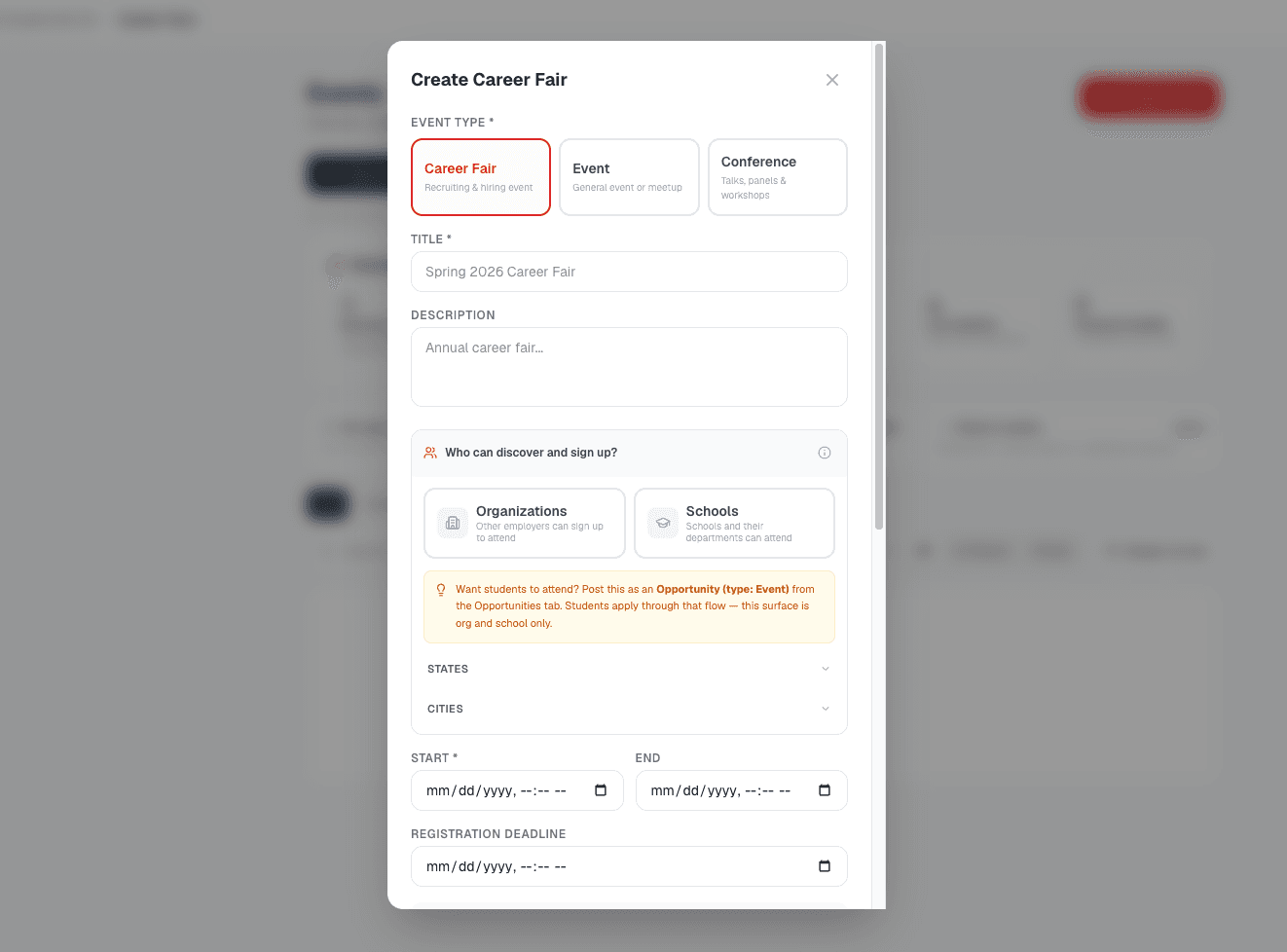
Create a fair, event, or conference with capacity, waitlist, registration deadline, and what to bring, all in one form.
Audience targeting
Invite organizations, schools, and departments, and narrow by industry, state, or city so only the right partners can register.
Signups and waitlists
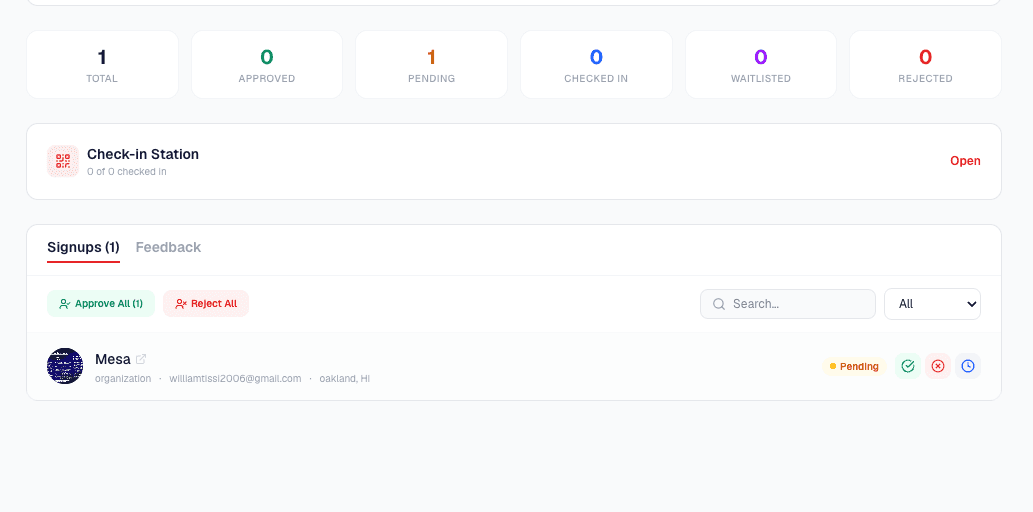
Approve, waitlist, or decline registrations. Eligibility is enforced on the server, never just hidden in the feed.
Built-in check-in
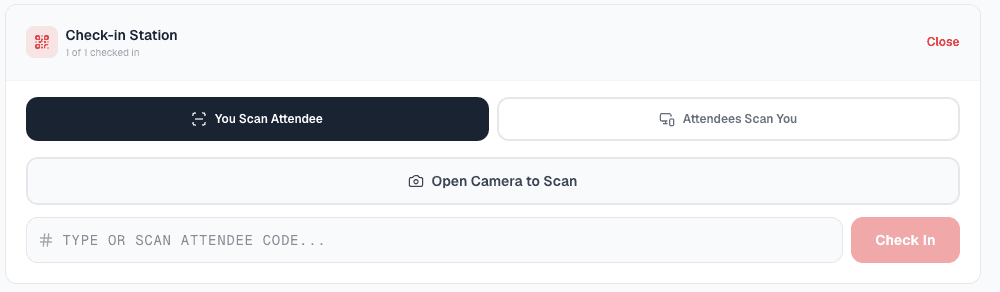
A rotating, secure QR code attendees scan to self-check-in, plus manual list check-in for anyone without a code.
Live attendance
Watch check-ins climb in real time, see the mix of organizations and schools, and track progress against registrations.
Timezones handled
Schedule once in the event timezone. Every viewer sees the time in their own settings timezone, clearly labeled.
Automatic reminders
Timezone-aware reminders go to hosts and attendees at seven days, two days, twenty-four hours, and one hour out.
Email attendees
Reach everyone who registered, or a single status group, with branded messages in a couple of clicks.
Export and save
Download the attendee list as CSV or save it straight to your Documents tab. Every export is audit logged.
Feedback analytics
Collect ratings and comments after the event so the next one is better than the last.
Share with partners
Forward an event to another organization, school, or department as a direct message. Students never see the link.
One toolkit, any event type
Whether it is a packed in-person fair or a focused virtual conference, you run it the same way.
Career fairs
Bring organizations and schools together. Target the right industries and regions, manage capacity and a waitlist, and check everyone in at the door.
Events
Info sessions, mixers, open houses, networking nights. Set a deadline, invite your audience, and track who shows up.
Conferences
Multi-partner, in person or virtual. Share the agenda, register attendees, and measure attendance and feedback across the day.
No clipboard, no spreadsheet, no guessing
Display a QR code on a screen and attendees scan it to check themselves in. The code rotates every few minutes so a screenshot from last week is useless. For anyone who lost their phone or never got the email, look them up and check them in by hand. Attendance updates live, and an accidental check-in is one tap to undo.
- Rotating, secure self-check-in QR code
- Manual list check-in for anyone without a code
- Live attendance against your registration count
- Undo an accidental check-in instantly
Secure by design: codes rotate and expire, so a screenshot never works twice.
See it in the product
From discovering an event to checking the last attendee in, here is what it looks like.
Frequently asked questions
- What kinds of events can I run?
- Career fairs, events, and conferences, both virtual and in person. You set the title, schedule, location or virtual link, capacity, waitlist, registration deadline, and what attendees should bring. The same host tools cover all three event types.
- Who can attend an event I host?
- You choose the audience when you create it. Invite organizations, schools, and departments, and narrow by industry, state, or city so only the right partners can register. Eligibility is enforced on the server on every signup, not just hidden in the feed, so a direct request from an ineligible account is refused. Students attend through a paired event opportunity, not the fair signup list.
- How does check-in work?
- Two ways, both built in. Display a secure QR code that rotates every few minutes and attendees scan it to self-check-in, or look anyone up and check them in manually from the attendee list, which covers the person who lost their phone or never got the email. Attendance updates live as people arrive, and you can undo an accidental check-in.
- Do you handle timezones?
- Yes, automatically. You schedule an event in its own local timezone, and every viewer sees the times converted to the timezone in their account settings, with a clear label telling them which zone they are looking at. Reminders are sent in each recipient timezone. Nobody does the math and nobody shows up an hour off.
- What analytics do I get?
- Live signup and attendance counts, the mix of organizations and schools attending, check-in progress against registrations, and post-event feedback with ratings. You can email everyone who registered, export the attendee list to CSV, or save it straight to your Documents tab, all scoped to your event and audit logged.
- Can I reuse or republish events that other organizations or schools post?
- Event listings are shown to participating accounts so they can decide whether to attend or partner. They are not a public dataset to scrape, copy, or republish into another product, and automated collection is prohibited. What you may and may not do with content on the platform, including event listings, is set out in our Terms of Service. You can always share an event with another partner using the built-in share tool, which sends it as a message rather than exposing a raw link to outsiders.
Explore more
Run your next event the easy way
Create an account, host your first fair in minutes, and let check-in, reminders, and analytics run themselves.