Messaging and outreach
Start the right conversation, in one real-time inbox.
We believe communication between students, organizations, departments, and schools is the point of the platform. So we built one inbox that connects every side, with typing indicators, read receipts, reactions, attachments, and reporting in every conversation, plus the outreach tools an organization needs to reach the students who fit, and to surface an opportunity that is not getting enough views to exactly the right people.
One inbox
Every conversation in one organized place.
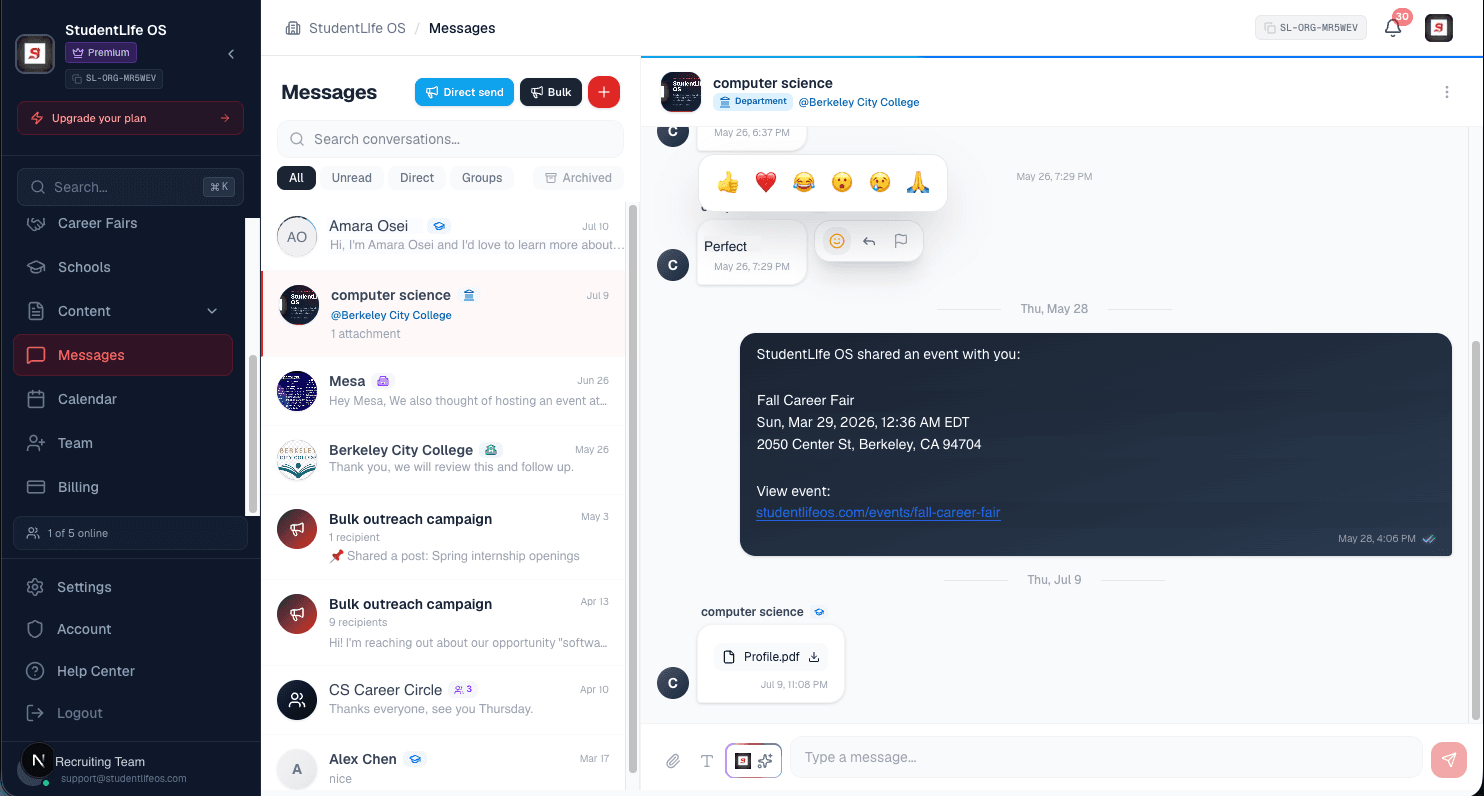
Direct messages and group chats live side by side. Conversations update live as people type and reply, so you are never refreshing to see what changed. Pin what matters, archive what is done, and mute what is noisy, all per conversation.
- Unified listDirect and group threads together.
- LiveReal-time typing and delivery.
- Read receiptsSee when a message is read.
- View profileOpen the other party from the thread.
Four ways to reach people
From one conversation to a whole audience.
Begin with a single message, build a room, write to a hand-picked list, or reach everyone who fits. The same friendly, personal thread either way.
Direct message
One to one
A private conversation with one person. Start it from a profile, a search result, an applicant, or anyone you are connected with. It is the simplest way to begin a real relationship, and replies always stay open.
Group chat
A few people, one room
Create a room with several people who can all see and reply. Great for a team, a cohort, a shortlist, or a follow-up after an event. Anyone you add or who joins by link is in the room. Joining a group is always free.
Direct Send
One message, a hand-picked list
Write one message and choose exactly who receives it. Each recipient gets the message in their own private thread, personalized with their name, so it reads like a one to one note rather than a blast. Attach an opportunity to point them somewhere specific.
Bulk Outreach
One message, a filtered audience
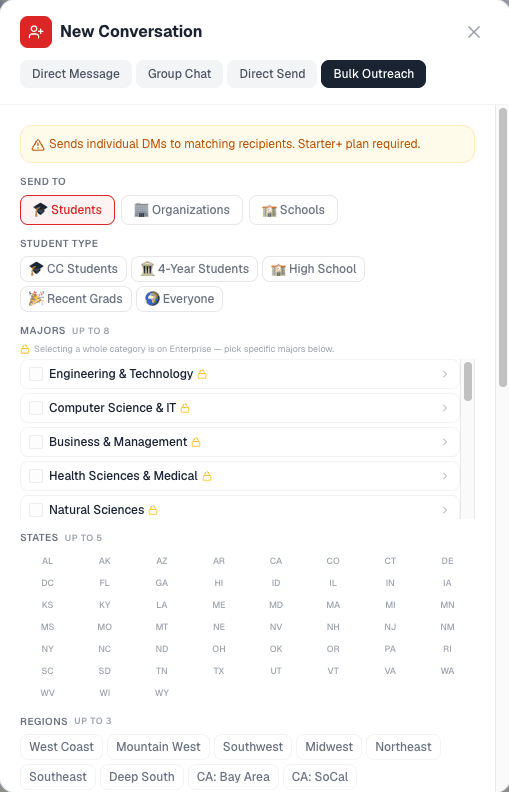
Reach the students who fit, by major, student type, location, interests, skills, and more. Or reach PARTNERS: other organizations and schools, filtered by industry, organization type, size, institution type, and location. Write once and the message goes to everyone who matches.
Bulk Outreach
Reach the students who fit, not a random list.
Choose your audience, write one message, and it reaches everyone who matches.
Attach an opportunity. If a posting is not getting enough views, attach it to your outreach and target the students who fit it. The right people get a real message with the opportunity, instead of waiting for it to surface in a feed.
Every audience filter you can choose from
Who they are
- Student type (community college, four year, high school, recent graduates)
- Current year
- Graduation year
What they study
- Specific majors
- Major categories
- Skills
- Interests
Where they are
- State
- Region
- City
- Specific school
More signals
- Minimum GPA
- Work authorization
A preview shows how many students match before you send, and personalization adds each recipient’s name automatically.
Reaching partners, not students
The same composer reaches other organizations and schools. This is the business-to-business side of the platform: find the counterparties you want to work with and contact them directly, with no list broker and no purchased contact data.
What they do
- Industry
- Organization type (company, nonprofit, government, foundation, startup)
- Company size
Institutions
- Institution type (university, community college, high school, trade, bootcamp)
Where they are
- State
- Region
- City
Signal
- Verified employers only
- Currently posting opportunities
- Partners you follow, or have not connected with yet
Reach widens with your plan, and lower plans aim at a more focused audience. You never receive a downloadable list of who matched: the message is delivered inside the platform. Schools and departments pay one negotiated price and are never filter-gated.
In every conversation
The same complete toolkit, everywhere.
Whether it is a direct message, a group, a Direct Send, or a Bulk Outreach, every thread comes with the same controls. Nothing is bolted on for one side and missing on another.
Read receipts
See the double check when your message has been read.
Typing indicators
Know when the other person is replying, live.
Reactions
React to a message to keep things quick and human.
Attach a document
Send a file along with your message.
Templates
Prefill a friendly opener with your name in one tap, then edit before you send.
Edit and delete
Fix a typo or remove a message you did not mean to send.
Pin
Keep an important conversation at the top of your inbox.
Archive
Tuck a finished conversation away without losing it.
Mute
Silence notifications for a conversation while staying in it.
View profile
Open the other party’s profile right from the thread.
Report
Report a conversation to a dedicated review queue at any time.
Encrypted at rest
Message content is encrypted in the database.
Audience model
Everyone can reach the people they are meant to.
We encourage communication across the platform, and we keep it safe by making sure each side only reaches its intended audience. These rules are enforced on the server.
Students
Reach any school or department from its public profile, and talk with organizations you connect with.
Organizations
Reach students who fit your audience, plus schools, departments, and other organizations.
Departments
Talk with students, organizations, and your parent school from your own institutional inbox.
Schools
A central institutional inbox for your office and your core team.
FAQ
Questions about messaging
What is messaging on StudentLife OS?+
It is one real-time inbox shared by every side of the platform. Students, schools, departments, and organizations talk in the same place, with typing indicators, read receipts, reactions, file attachments, and reporting built into every conversation. We believe communication between students, organizations, departments, and schools is the point of the platform, so we make it easy and safe to reach the right person.
What is the difference between a direct message, a group chat, a Direct Send, and a Bulk Outreach?+
A direct message is a one to one conversation. A group chat is a conversation you create with several people who can all reply. A Direct Send delivers one message to a hand-picked list of recipients, each in their own private thread. A Bulk Outreach delivers one message to a filtered audience of students who match the criteria you choose, such as major, location, or interests. Direct Send and Bulk Outreach are how an organization starts many conversations at once without losing the personal thread.
My opportunity is not getting enough views. Can messaging help?+
Yes. You can attach an opportunity to a Direct Send or a Bulk Outreach, then target the students who fit it by major, school, location, interests, and more. The students receive a real message with the opportunity attached, so the right people see it instead of waiting for it to surface in a feed.
Can I attach a document or use a template?+
Yes. You can attach a file to a message, and you can use a quick template that prefills a friendly opener with your organization name so you are not starting from a blank box. You can edit everything before you send.
How do you keep conversations safe?+
Every conversation has the same safety tools: you can report a conversation, mute its notifications, view the other party’s profile, and block where appropriate. Messages are encrypted at rest, audience rules control who can message whom, and abusive content is moderated. Reports go to a dedicated review queue.
Who can message whom?+
Students can reach any school or department from its public profile, and they can talk with organizations they connect with. Organizations can reach students who fit their audience, plus schools, departments, and other organizations. Schools and departments have their own institutional inbox. Each side can only reach the people it is meant to, and those rules are enforced on the server, not just hidden in the interface.
Start a conversation that matters.
Create an account to message students, schools, departments, and organizations, or talk with our team about reaching the right audience.