
One calendar for every interview, fair, and event, and scheduling that runs itself.
Keep track of what is coming in the months ahead, paint the windows your team is free, and let students book themselves in. Sync it all to your Google Calendar, save the meeting link once, and let automatic timezone conversion handle the rest. Built into the platform, not bolted on.
Unlimited availability and bookings. No per-interview or per-booking fees.
October 2026
Spring Interviews
12 open windows this week
Shown in your timezone
One calendar
Interviews, fairs, and events in a single month view
Self-serve booking
Students pick a slot. No email back and forth
Two-way Google sync
Everything in your personal calendar, kept in step
Timezones handled
Converted automatically for every viewer
Four tabs, one command center
The Calendar tab is the same on every admin side: organizations, schools, and departments. Tap through each one to see it in action.
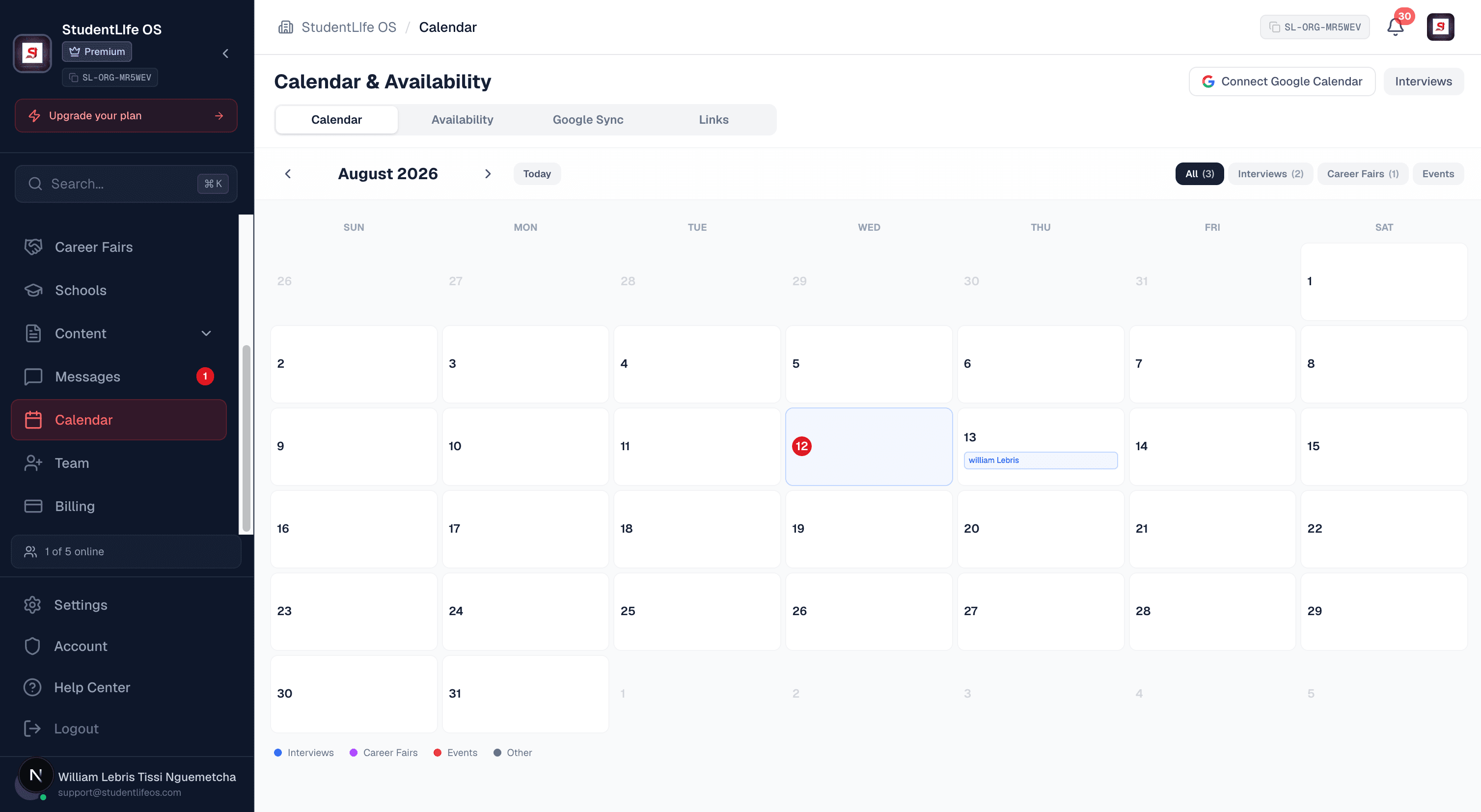
One month view of every interview, career fair, and event, built from your real activity.
- Color coded with a live count per filter
- Click a day for its agenda and join links
- Step through the coming months
Everything scheduling, in one place
From the month view to the meeting link, the whole scheduling lifecycle lives in one tab, with the busy work handled for you.
One operating calendar
Interviews, career fairs, and events from across the platform on a single month view, color coded, with a count on every filter.
A real agenda
Click any day to open its agenda with start and end times, descriptions, and a one tap join link for virtual meetings.
Paint your availability
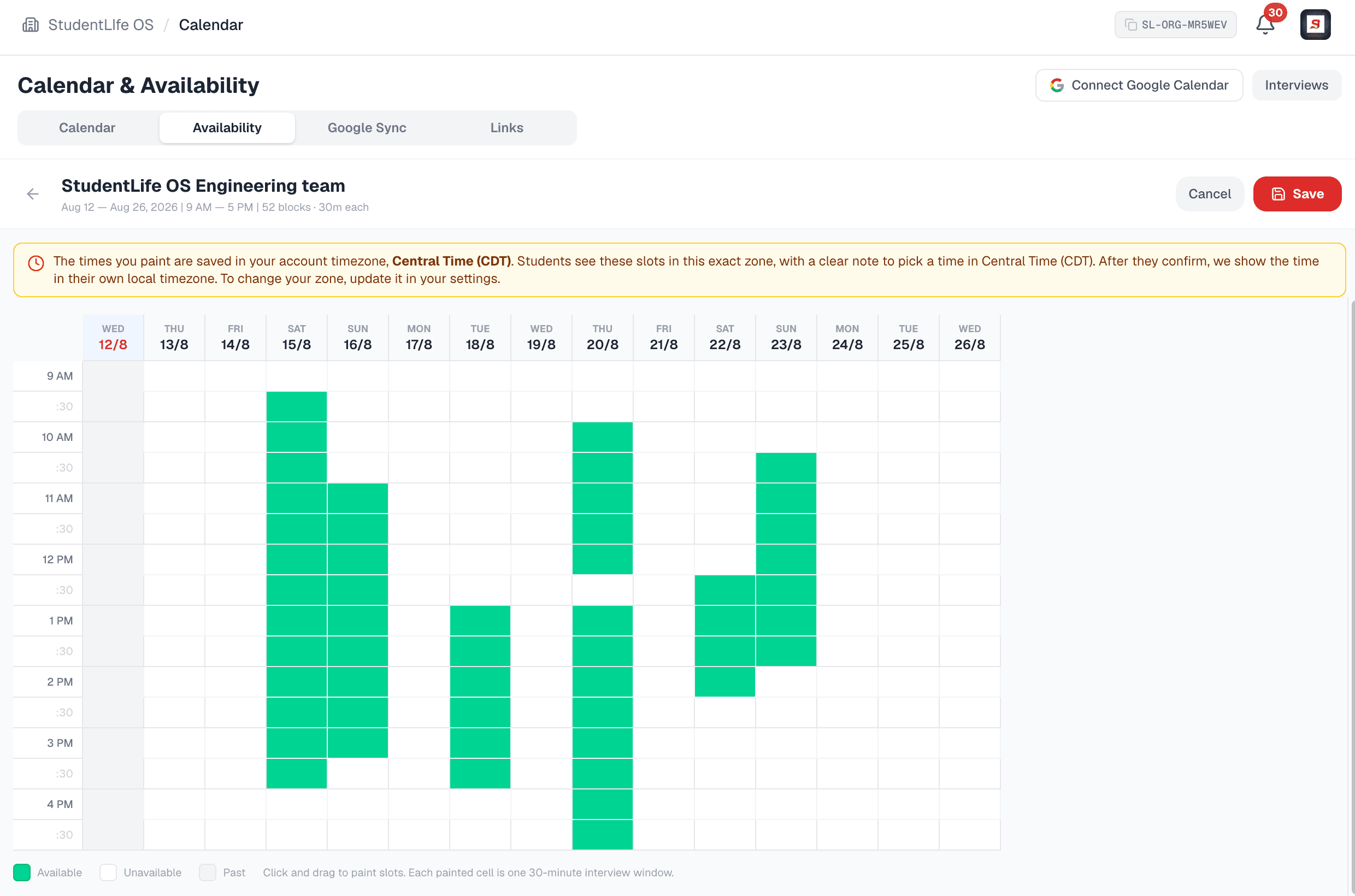
Click and drag across the grid to set the exact 30 minute windows your team is free. The friendliest scheduler you have used.
Unlimited sets
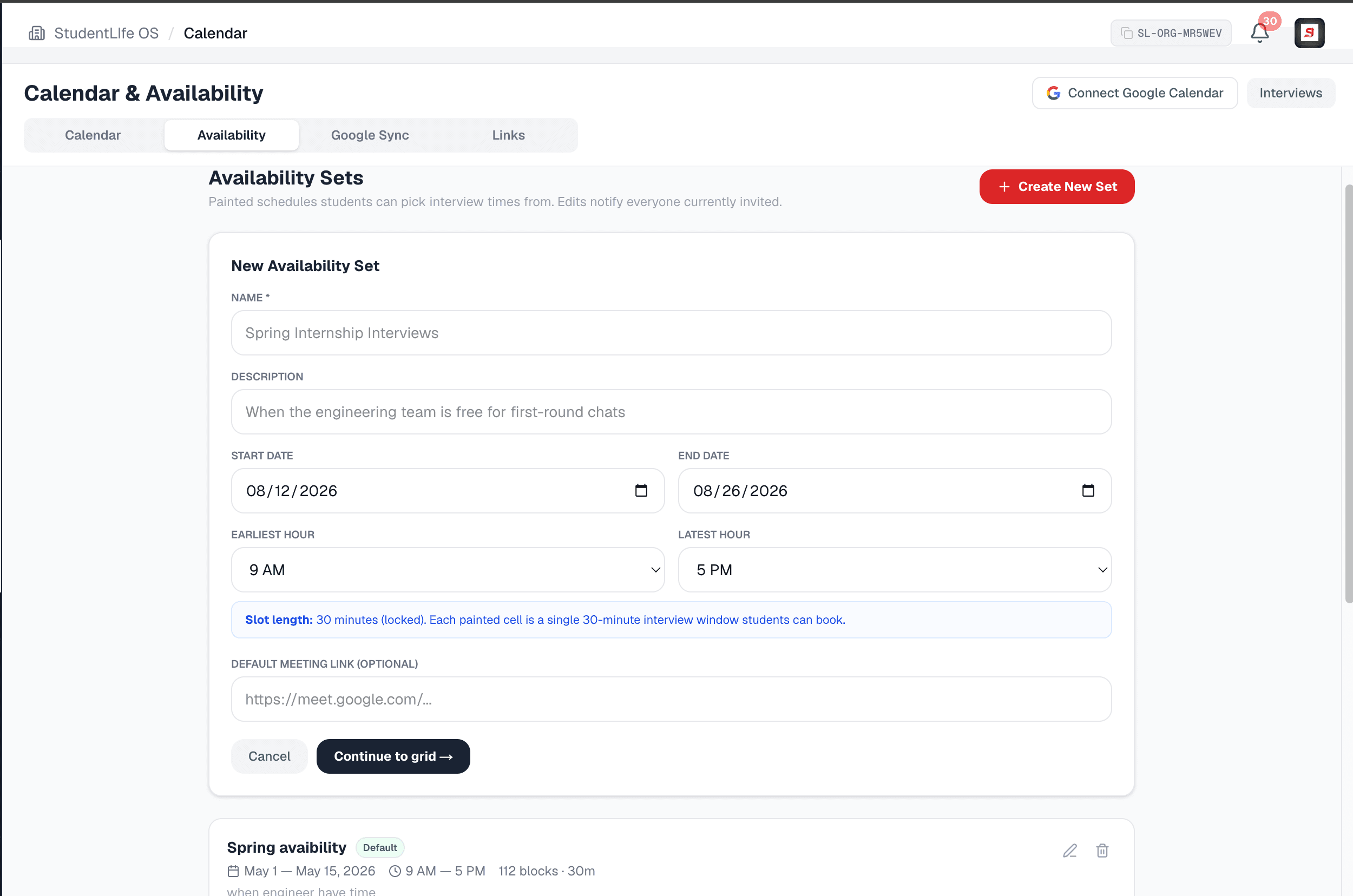
A set per interviewer, team, or round, each with its own dates, hours, and meeting link. No cap, no per-interview fee.
Students book themselves
Candidates see only your open windows and pick one. No back and forth email, no double bookings, no manual scheduling.
Pin to an opportunity
Attach a set to a specific role and invite candidates straight from the hiring drawer with a single click.
Two-way Google sync
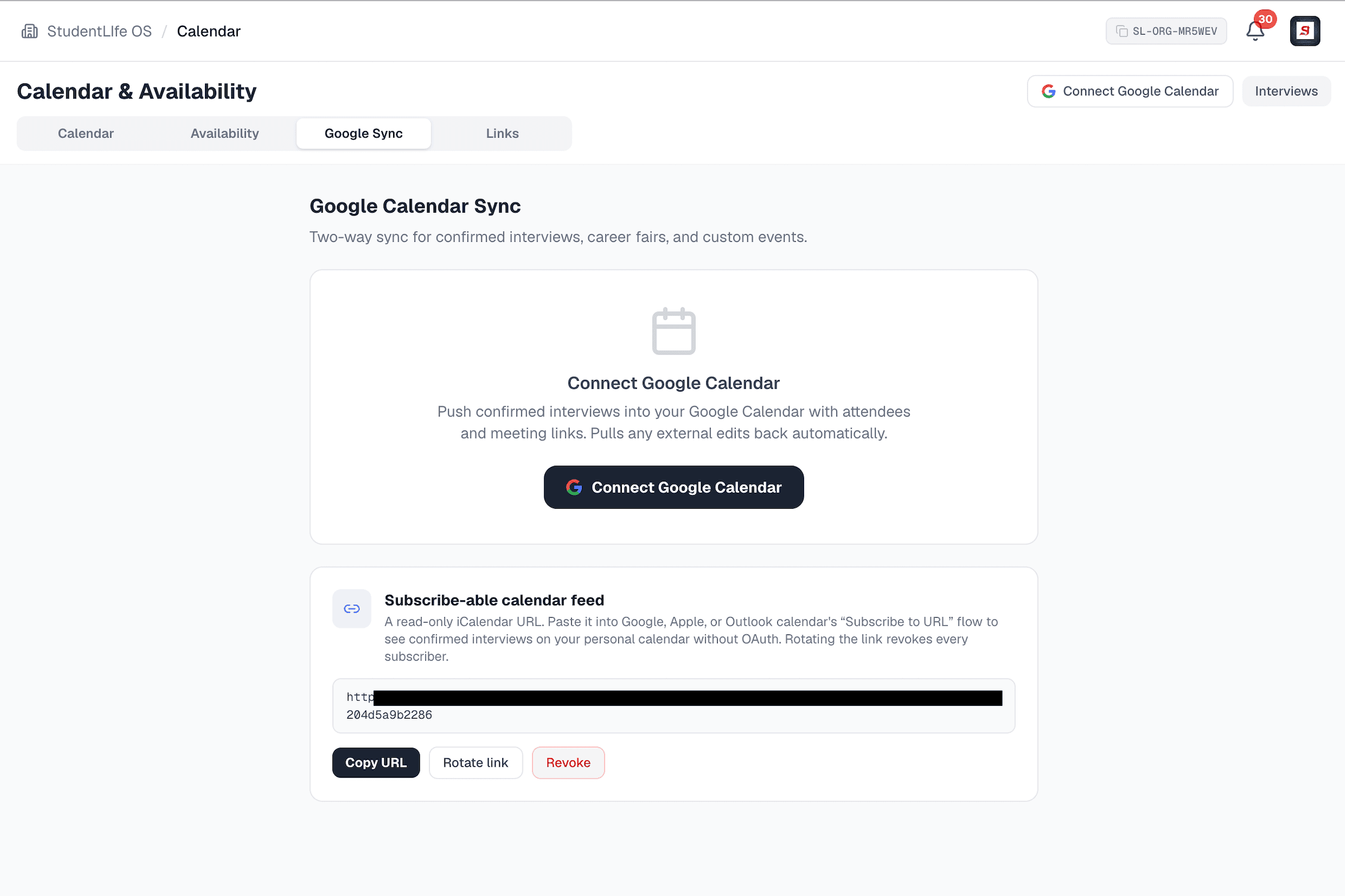
Push confirmed interviews and events into Google Calendar with attendees and links, and pull external edits back automatically.
Subscribe-able feed
A read only calendar feed link for Apple Calendar, Outlook, or Google. No account connection required. Rotate or revoke any time.
Saved meeting links
Save your Zoom, Meet, or Teams link once and it travels with every interview, reaching the student at the right moment.
Timezones handled
Paint in your institution timezone, students see it labeled, confirmations and reminders convert to each viewer own zone.
Reminders that convert
Interview and event reminders go out automatically, each one in the recipient own timezone, to hosts and attendees alike.
Safe by design
Meeting links are https only and checked against a trusted host allowlist, so a phishing or look-alike link can never be saved.
Know what is coming, months ahead
A busy team forgets. The calendar is your reminder of everything you committed to: the interviews you are running, the career fairs you are hosting or attending, the events on the books. It is assembled from your real activity across the platform, so there is nothing to copy over and nothing to keep in sync by hand.
- Color coded by interviews, career fairs, and events, with a live count on each filter
- Click any day to open its agenda with times, details, and a join link
- Step forward through the coming months so nothing sneaks up on you
- Built from what you actually have scheduled, never a separate thing to maintain
This month
First-round interviews, Software Intern
Tue 146 windows booked
Fall Tech and Internship Fair
Thu 16Hosting, 320 registered
Info session, Data Science
Mon 20Event, 2:00 PM your time
Final-round interviews, Product
Wed 224 windows open
Interview scheduling is a mess. We fixed it.
Coordinating interview times over email is the part everyone dreads: proposing five slots, waiting, re-proposing, double booking, chasing a meeting link. So we built the availability engine. Create a set, open the grid, and click and drag to paint the windows your team is free. Students see only your open slots and book themselves in. That is the whole thing.
- Click and drag the friendly grid to paint exact 30 minute windows
- Create a set per interviewer, team, or round, with no limit and no per-interview fee
- One shared team meeting room, or a different link per set, your call
- Pin a set to an opportunity and invite candidates from the hiring drawer
- Editing a set notifies everyone currently invited, so no one shows up to a moved window
Unlimited sets and slots. The scheduling engine is unmetered.
Painted in your institution timezone. Click and drag to paint. Each cell is one 30 minute window.
Connected to you@gmail.com
Last sync just now, two way
Confirmed interviews
Pushed with attendees and the meeting link
Career fairs and events
Hosting or attending, kept in step
External edits
Moved or cancelled in Google? Pulled back here
Everything you have going on, in one place
Schools, departments, organizations, and students all have a lot on. Our job is to make your day easier, not give you one more calendar to check. Connect Google Calendar and your StudentLife OS schedule lives right alongside the rest of your life, kept in step both ways.
- One click to connect, revocable any time you disconnect
- We ask only to manage calendar events and read your account email
- Authorization is encrypted at rest and never shared
- Students choose which categories sync: interviews, invites, offers, saved deadlines
Stop hunting for the meeting link
The five minutes before an interview should not be spent finding the right Zoom link and pasting it into an email. Save your meeting link once and it travels with the interview: attached to the student confirmation, their reminders, and their calendar entry. They have it the moment they need it, and you never send it by hand again.
- One default meeting link, or a different link per availability set
- The link reaches the student at booking, in reminders, and on their calendar
- Also shown on your career fair cards and your public profile
- No re-sending, no wrong link from last week, no back and forth
Links are validated before they are saved
A saved link must use https and resolve to a trusted host. The domain is matched by its real registrable name, not a substring, so a look-alike can never slip through.
Zoom, Google Meet, Microsoft Teams, Webex, Whereby, and Calendly or Cal.com booking links are supported.
Nobody shows up an hour off
Time math is where scheduling quietly breaks. We do it for you, on the server, every step of the way, from the institution that paints the slot to the student who books it.
You paint in your zone
Availability is stamped on the server in your institution timezone, so two teammates in different cities always produce the same window.
Students see it labeled
Candidates view your open slots in your institution timezone with a clear banner telling them which zone they are picking in.
Confirmations and reminders convert
Once a student confirms, we show their own local time, and every reminder goes out converted to each recipient timezone.
See it in the product
The same four tabs on every admin side. Here is what they look like in the portal.
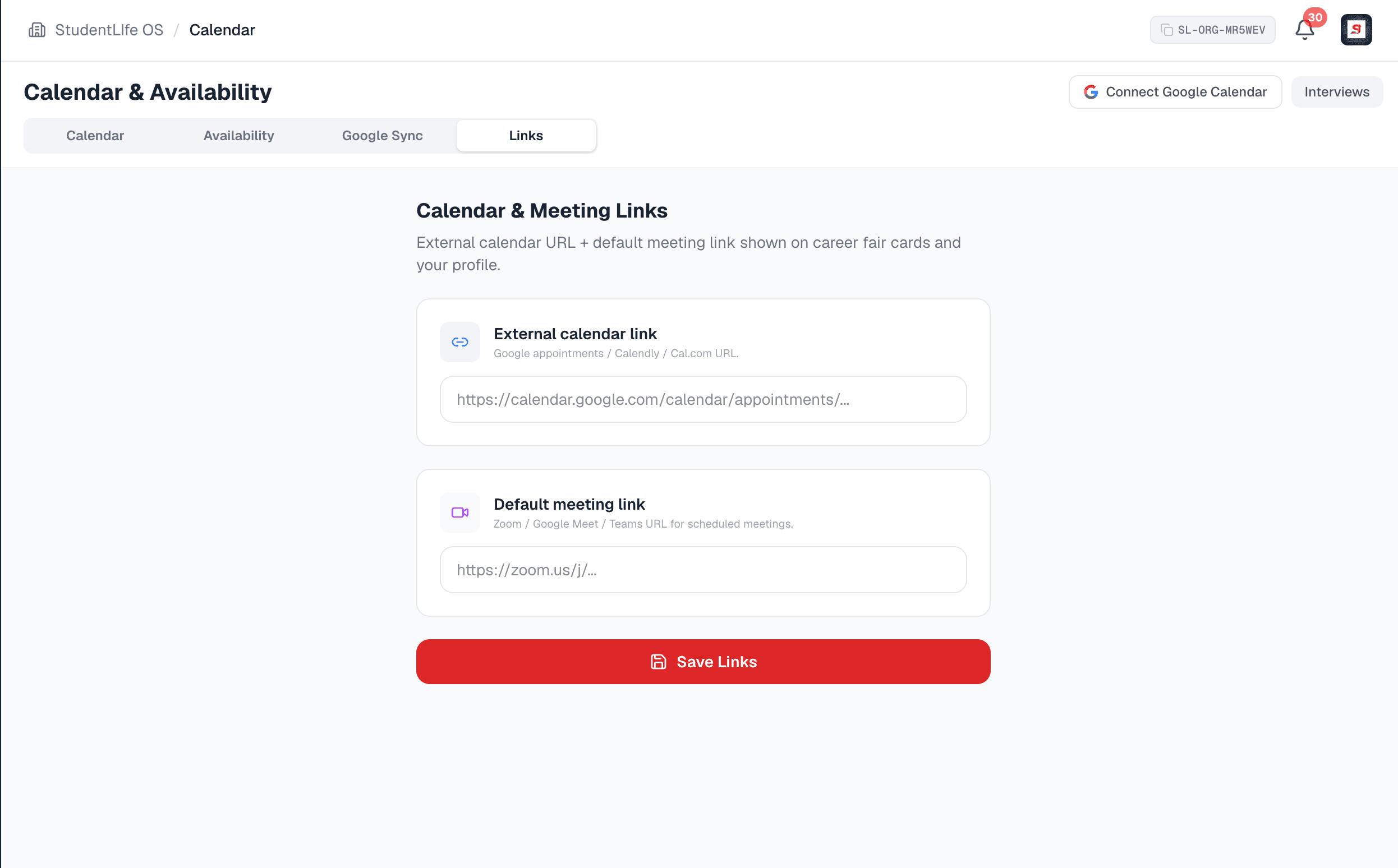
The same on every side
Organizations, schools, and departments run the exact same Calendar tab. Students get a personal calendar and Google sync of their interviews, invitations, offers, and saved deadlines.
See what each plan includesOne toolkit, four sides
The calendar is woven through the whole platform, so every kind of account stays on top of what is next.
Organizations
Run interview rounds, track the fairs you attend, and keep recruiting on schedule across the team.
Schools
Coordinate office interviews, campus events, and career fairs in one place, included with your plan.
Departments
Your own Calendar tab, separate from the school office, with the same availability engine and Google sync.
Students
A personal calendar of interviews, invitations, offers, and saved deadlines, with optional Google sync.
Interview scheduling is part of the recruiting toolkit: included for schools and departments, and on the Pro plan and above for organizations. See the pricing page for the full breakdown.
Frequently asked questions
- What shows up on the calendar?
- Everything you need to keep track of, in one month view: confirmed interviews, the career fairs and events you host or attend, and any custom entries. Filter by interviews, career fairs, or events, see a count on each chip, click any day to open an agenda with times and a join link, and step forward through the coming months so nothing sneaks up on you. The calendar is built from your real activity across the platform, so it is never a separate thing to maintain.
- How does interview scheduling work?
- You create an availability set, give it a name and a date range and the earliest and latest hour, then open the grid and click and drag to paint the 30 minute windows your team is free. Pin a set to a specific opportunity if you want, set a default, and invite candidates with one click from the hiring drawer. Students see only your open windows and book themselves in. No email threads, no proposing five times and waiting, no double bookings.
- Is there a limit on availability sets or interviews?
- No. Create as many availability sets, interview windows, and bookings as you need. There is no cap and no per-interview, per-slot, or per-booking fee. The scheduling engine is unmetered. Interview scheduling is part of the recruiting toolkit, which is included for schools and departments and is on the Pro plan and above for organizations. See the pricing page for the full breakdown.
- Can different team members have different availability?
- Yes. Stand up a separate set for each interviewer, team, or round, each with its own dates, hours, and meeting link. One person can use a shared team meeting room while another uses their own, and a first round set can run alongside a final round set without colliding. Editing a set notifies everyone currently invited to it so nobody shows up to a window that moved.
- How do you handle timezones?
- Automatically, end to end. You paint availability in your institution timezone, and the times are stamped on the server in that zone, so two teammates in different cities always produce the same window. Students are shown the slots in your institution timezone with a clear banner telling them which zone to pick in, and once they confirm we show the time in their own local timezone. Reminders go out converted to each recipient timezone. Nobody does the math and nobody shows up an hour off.
- Can I connect my personal Google Calendar?
- Yes. Connect Google Calendar in one click and confirmed interviews, career fairs, and events sync both ways: we push them into your Google Calendar with the attendees and the meeting link, and we pull external edits back automatically. We request only the permission to manage calendar events and to read your account email, and the authorization is encrypted at rest and revocable any time you disconnect. Prefer not to use Google? Generate a read only calendar feed link and subscribe to it from Apple Calendar, Outlook, or Google without connecting an account. Students can connect their Google Calendar too and choose which categories sync.
- How do students get the meeting link?
- You save your meeting link once and it travels with the interview. When a student books or is invited, the link is attached to their confirmation, their reminders, and their own calendar entry, so it is there at the moment they need it. No hunting through email, no re-sending a Zoom link five minutes before, no wrong link from last week. You can set one default meeting link or a different link per availability set.
- Are the meeting links safe?
- Yes. A saved meeting link must use https and must resolve to a trusted host on our allowlist, which covers Zoom, Google Meet, Microsoft Teams, Webex, Whereby, and a few others, plus Calendly and Cal.com booking links. The host is matched by its real registrable domain, not a substring, so a look-alike like zoom.us.example.com is rejected, and schemes like javascript: or data: can never be stored. This protects the thousands of students a link might reach.
- Do students get a calendar too?
- Yes. Students get a personal calendar of their interviews, pending interview invitations, offers, and the application deadlines they saved, and they can connect Google Calendar and pick exactly which of those categories sync. Times are always shown in the student own timezone. It is the same philosophy as the admin side: one place to see what is coming, with the reminders handled for you.
- Who can use the Calendar tab?
- Organizations, schools, and departments all get the same four tabs: Calendar, Availability, Google Sync, and Links. Students get a personal calendar and Google sync. Within an institution, the actions are role gated and enforced on the server, so only the people who should manage interviews can paint availability or change the saved links, while the rest of the team can still see what is scheduled.
Explore more
Put your scheduling on autopilot
Create an account, paint your first availability set in minutes, and let booking, reminders, timezones, and Google sync run themselves.